Wireless
| Done |
|---|
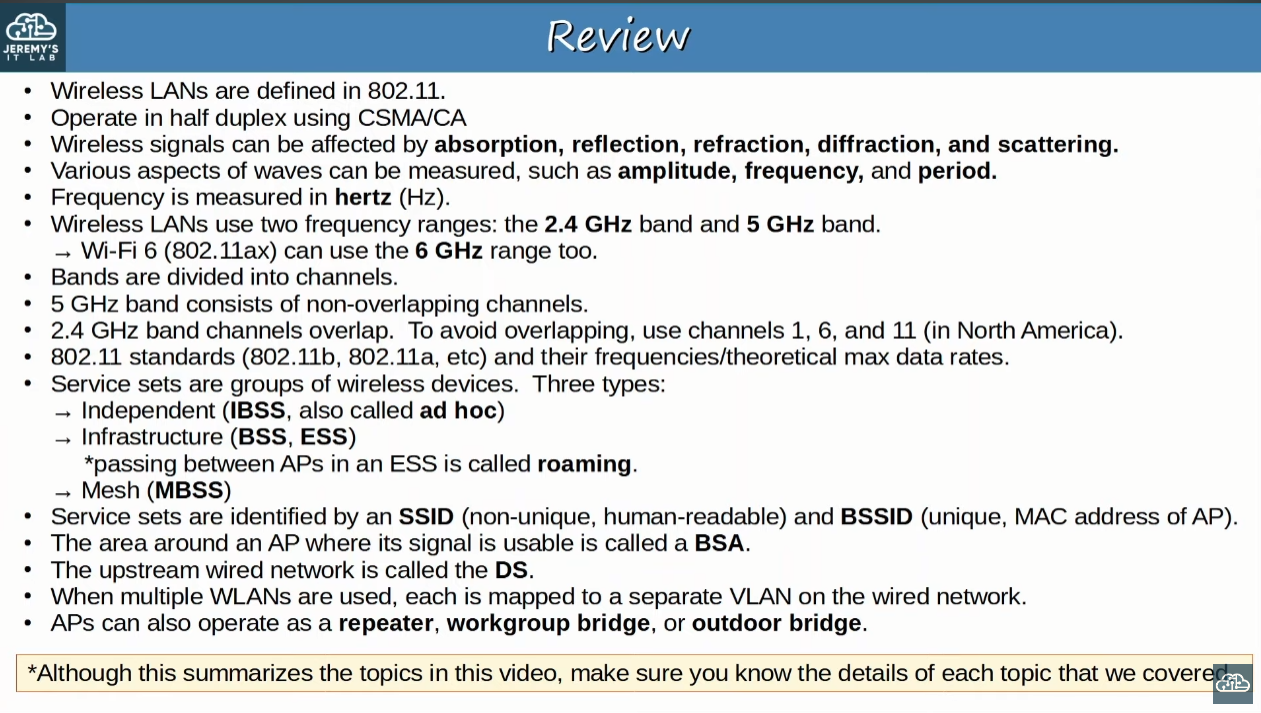
The standards for wireless LANs are defined in the IEEE 802.11. Also, Wi-Fi is a trademark of the Wi-Fi Alliance, which is responsible for testing and certification of equipment over the 802.11 standards.
Issues of Wireless Networks
- All devices within the range will receive the frames, like devices connected to a hub.
- Privacy concern .
- CSMA/CA (Carrier Sense Multiple Access with Collision Avoidance), so it works with half-duplex.

- Wireless communications are regulated by international and national bodies.
- Fortunately, 802.11 outlines which frequencies the compliant devices must use.
- Devices using the same channels can cause interference.
- Wireless signal coverage area must be considered.
- Signal range.
- Signal absorption, reflection, refraction, diffraction and scattering.
- Absorption: It happens when the electromagnet waves are absorbed and turned into heat when trespassing a material. This results is a weakened signal.
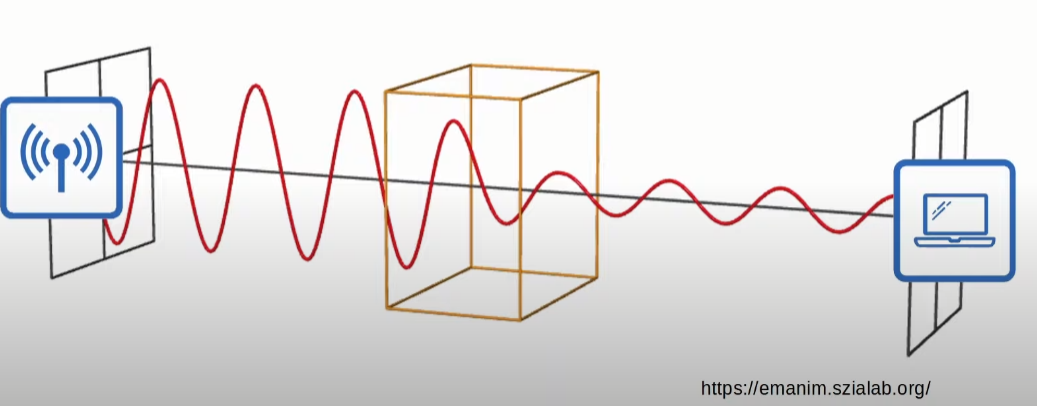
- Reflection: It happens when the signal bounces off a material, for example metal.
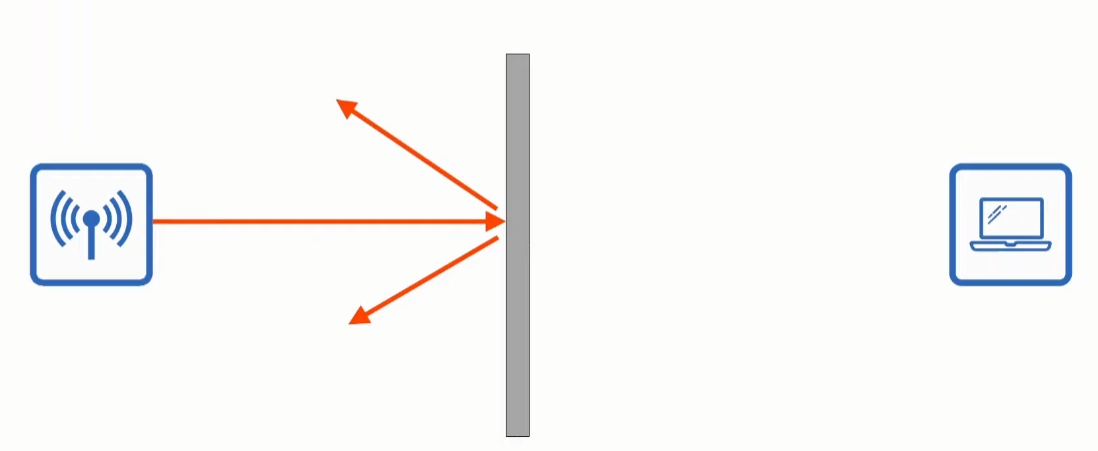
- Refraction: This results with the signal being bent, it happens when it enters a medium that changes its speed, like glass and water.
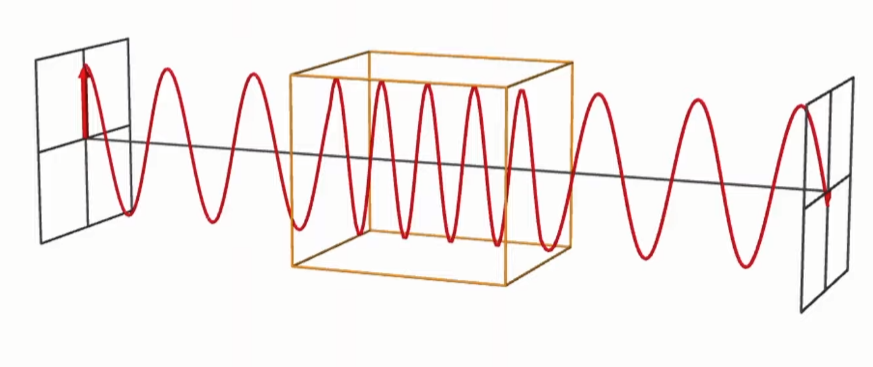
- Diffraction: This happens when a wave encounters a obstacle and travels around it.
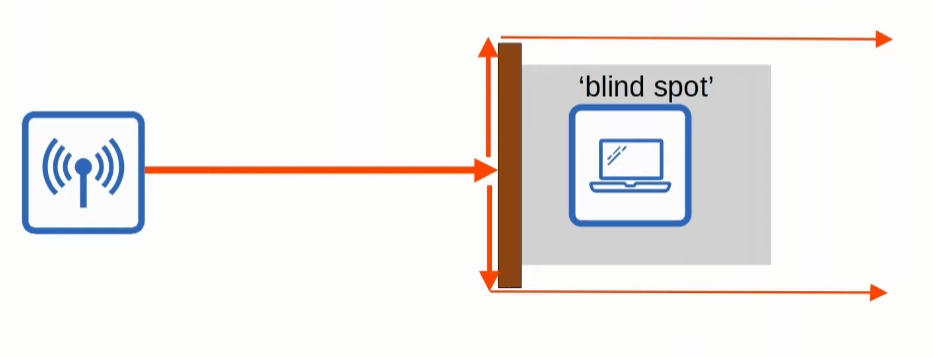
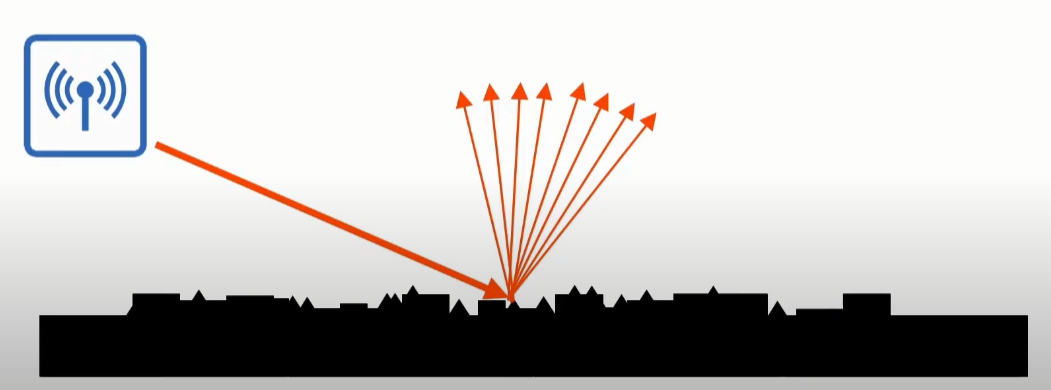
- Scattering: An uneven surfaces causes the signal to scatter in all directions. Some materials that cause that are dust, smog, etc.
- Absorption: It happens when the electromagnet waves are absorbed and turned into heat when trespassing a material. This results is a weakened signal.
Radio Frequency
If applied an alternating current in an antenna, it will produce an electromagnetic field which propagates as waves
You can measure such waves through amplitude and frequency:
- Amplitude: It is the maximum strength of the electromagnetic field. It is the distance from the center of the wave to the top of a crest or the bottom of a trough.
- Frequency: It is the amount of cycles per a given time. In hertz the unit of time is seconds.
- For example, if a wave repeats itself 4 times in a second, it has a frequency of 4 Hz
- Period → It is the amount of time that took each cycle. It is the inverse of the frequency.
Frequency
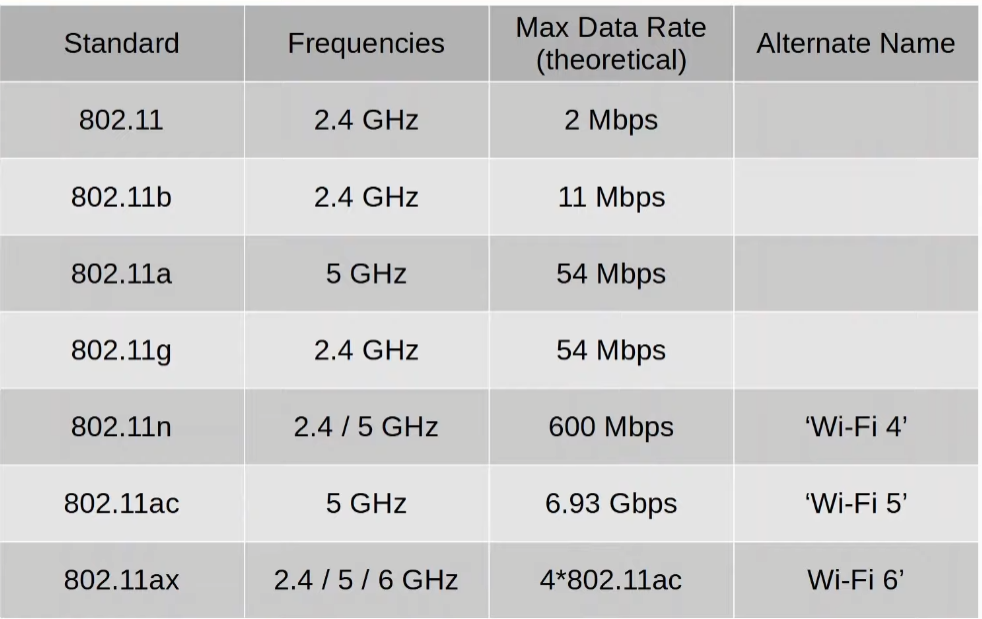
Wi-Fi uses two main bands (frequency ranges)
- 2.4 GHz💡NOT IMPORTANT: The actual range is 2.400 GHz to 2.4835 GHz.
- It reaches further distances at open space and can penetrate better obstacles.
- However, it suffers more from interference since more devices use this band.
- 5 GHz💡NOT IMPORTANT: The actual range is 5.150 GHz to 5.825 GHz.
Channels
Each band is divided into channels. Usually a device will transmit and receive in only one channel.
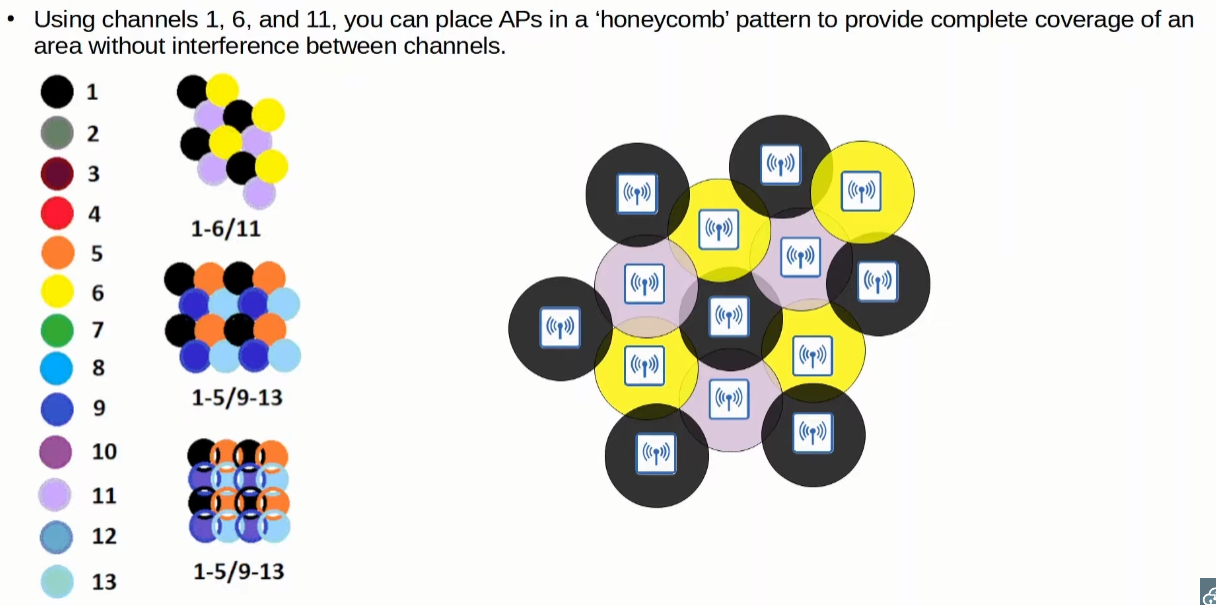
Channels also overlap each other frequency range. It is recommend to use APs in those selected channels that don`t overlap each other to avoid interference.
2.4GHz
It is divided into several channels, each one having a frequency range of 22 MHz.
Among those channels, it`s recommended to use the channels 1,6 and 11, because they don`t overlap each other (their frequency ranges are separated).
5 GHz
It is also divided into several channels, each one having a frequency range of 20 Mhz.
There is more non-overlapping channels than 2.4GHz
Honeycomb
Knowing the previous fact, it is recommended that you put the APs in a honeycomb like pattern with non-overlapping channels.
Standards
Service Sets
They are groups of wireless networks devices
There are three main types:
- Independent
- Infrastructure
- Mesh
All devices within a same service set has the same SSID (Service Set Identifier)
SSID is a human-readable name to identify a service set, a group of wireless network devices.
IBSS (Independent Basic Service Set)
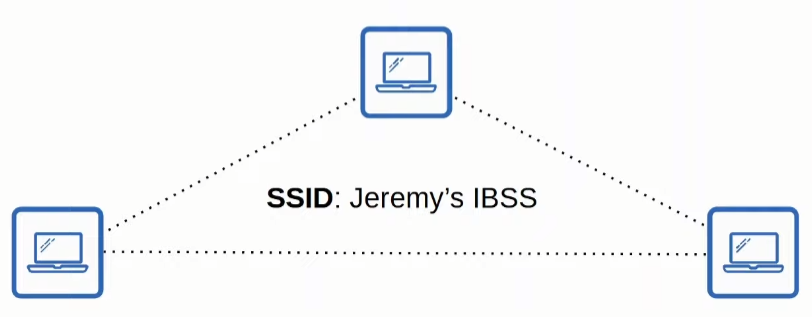
It is a wireless network where wireless devices connect directly to each other without using an AP (Access Point)
An example of Independent Basic Service Set is AirDrop.
BSS (Basic Service Set)
It is a kind of Infrastructure Service Set, this times all devices connect to an AP (Access Point) to then communicate with each other.
Since it is a Service Set, it has a SSID. However, it also has a BSSID (Basic Service Set ID) that is associated with the AP`s radio MAC Address, therefore, being unique.
Wireless devices request to associate with the BSS. Also, those devices will then be called “clients” or “stations”.
The physical area (range) that the APs is capable of generating a usable signal is called BSA (Basic Service Area).
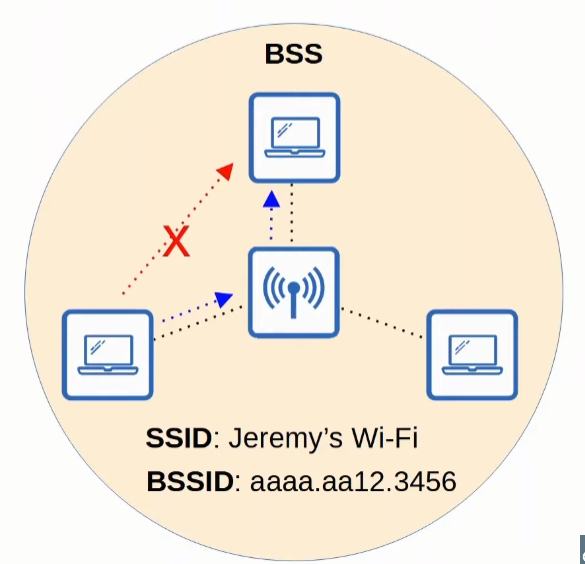
But How can someone extended an wireless LAN?
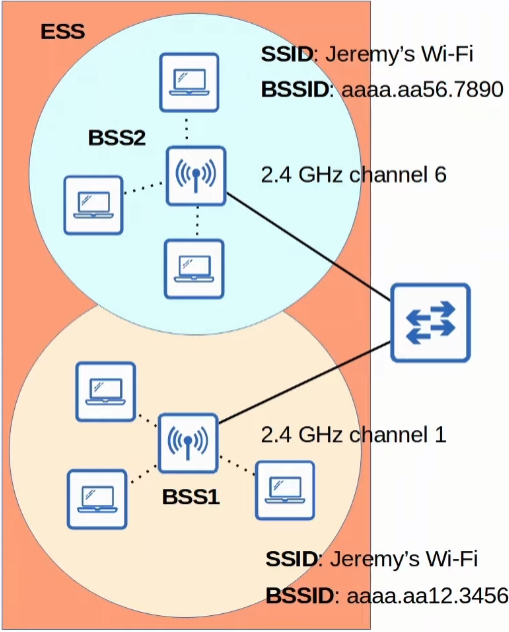
Devices connected to the same AP (Access Point) are in the same BSS (Basic Service Set). However, if you want to have multiple APs, and therefore, multiple BSSs acting as a single logical wireless LAN (Local Area Network), you will have to form an ESS (Extended Service Set).
ESS (Extended Service Set) is a bundle of multiple BSSs, or access points, that form a single wireless LAN.
Some of the characteristics are:
- Each BSS will use have the SAME SSID.
- Each BSS will have a UNIQUE BSSID.
- Each BSS uses different channels to avoid interference.
Also clients can move between APs without needing to reconnect, providing a seamless wi-fi experience when moving to different areas.
MBSS (Mesh Basic Service Set)
It is used in situations where a wired connection is not possible between APs. Therefore, there will be two radios:
- Normal one to provide a BSS to the wireless clients
- Backhaul network to connect the APs and bridge their traffic
At least one AP will be connected to the wire, such AP will be called RAP (Root Access Point). The other APs will be called MAP (Mesh Access Point).
Also, a protocol is used to determine the best path through the mesh.
Distribution System
This term referes to the wired infrastructure that maps the wireless one. So, usually every BSS or ESS will have a VLAN assigned in the wired network. This happens because most wireless networks are not standalone, there are the wired part of the infrastructure.
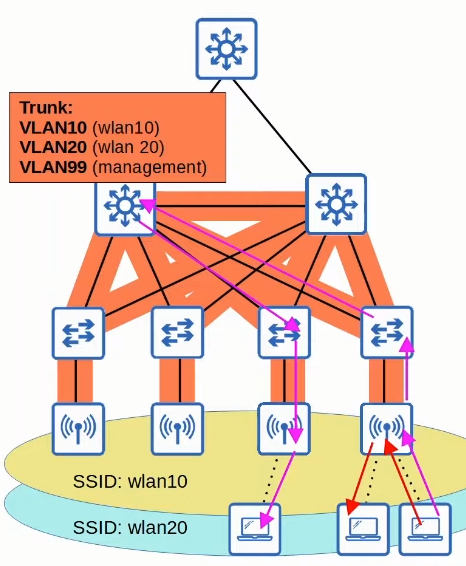
- It is possible for a single AP to create multiple wireless LANs (WLANs), each with their unique SSID.
- Each WLAN is mapped to a different VLAN connected to the wired network via a trunk.
- Each WLAN uses a unique BSSID, usually by incrementing the last digit of the BSSID by one.
Additional AP Operational Modes
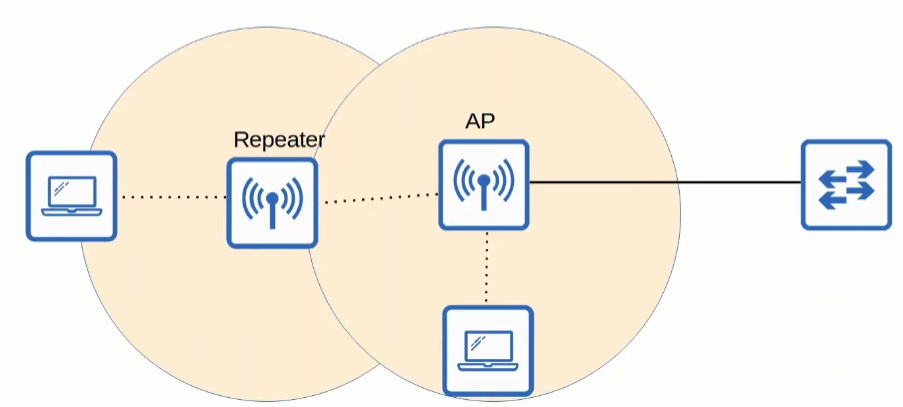
Repeater
As the name implies, it repeats the signal that it receives from the AP
If it has only one channel, it will retransmit in the same channel, causing interference. If not, it will retransmit in another channel.
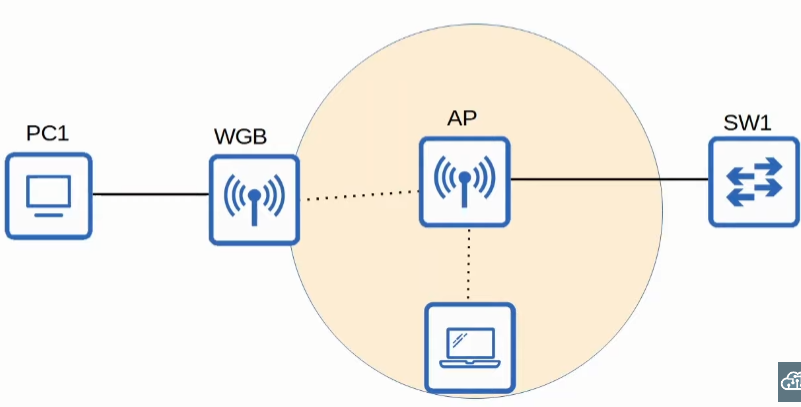
WGB (Workgroup Bridge)
It is a way for devices not capable of wireless capabilities to connect to a wireless network. In other words, the AP will be the bridge between a wired connection and a wireless one.
There are two types of WGBs:
- uWGB → an 802.11 standard that allows only one device to be bridged to the wireless network
- WGB → Cisco proprietary version that allows multiple wired clients to be bridged to the wireless network
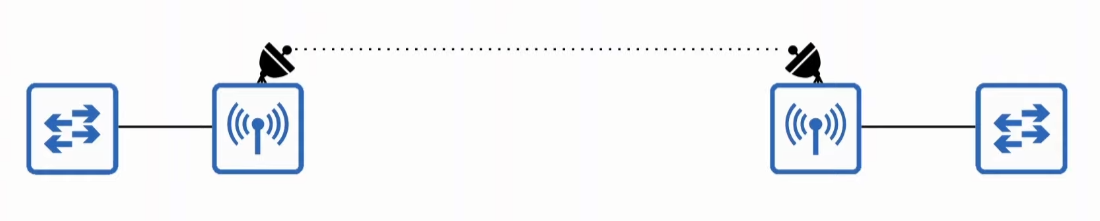
Outdoor Bridge
It is a way to connect networks over long distances without a physical cable. In this feature, the router will usually use specialized antennas and focus the transmit power over one direction.
It can be a point-to-point connection or point-to-multipoint.
802.11 Frame

- Frame Control: Tells the message type and subtype
- Duration/ID: It can very depending on the message type:
- Could indicate the time (in microseconds) that the channel will be dedicated to the transmission of the frame
- Could tell the identifier of the association (connection)
- Address: How many and the order of the addresses could vary depending on the message type, but they could be:
- Destination Address (DA): The final recipient of the frame
- Source Address (SA): The original sender of the frame
- Receiver Address (RA): The immediate recipient of the frame, not necessarily the final destination.
- Transmitter Address (TA): The immediate sender of the frame, not necessarily the original sender of the frame
- Sequence Control: It is a way for the frame to be re-arranged and duplicate frames to be discarded.
- QoS Control: As the name implies, it is used for QoS
- HT Control: HT means “High Throughput”, it is a field introduced in 802.11n, and is used for such.
- Frame Body (Packet): It is where the Layer 3 PDU is stored (Data + IP Header).
- FCS (Frame Check Sequence): Used to detect errors in the frame.
Association Process
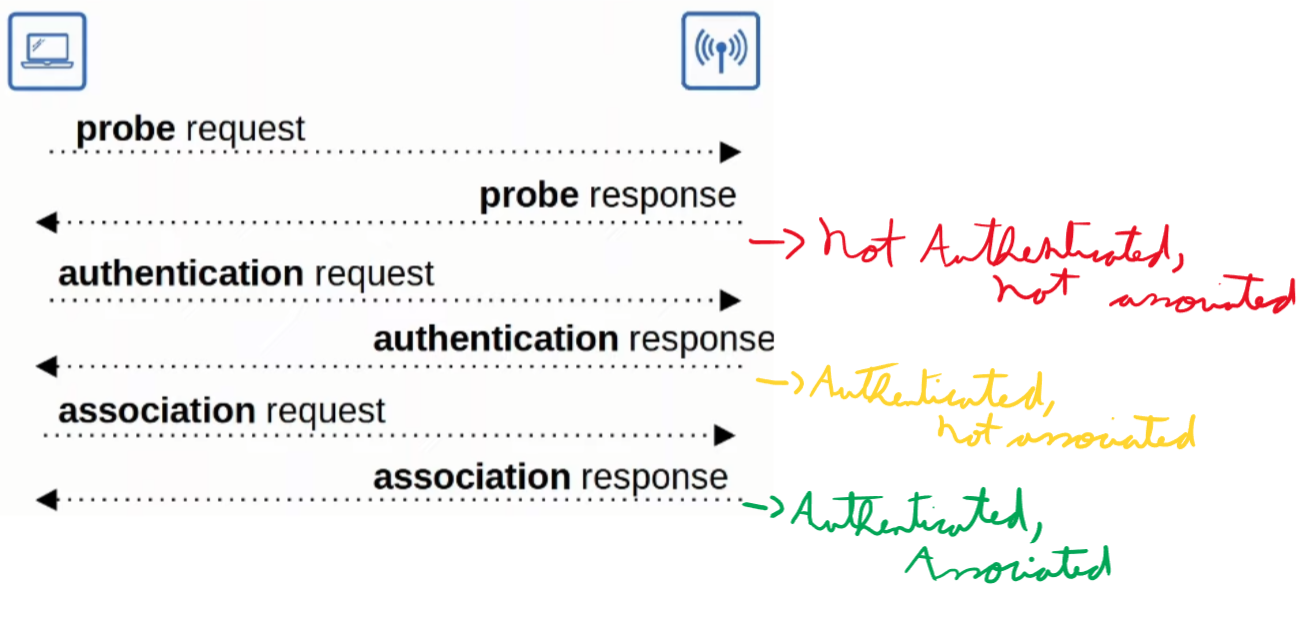
There are three states a station (client) can have with an AP:
- Not authenticated, not associated.
- Authenticated, not associated.
- Authenticated and associated.
- This last step is required in order for a client to send traffic through the AP
In order for a device to discover the possible BSSs there are two ways:
- Active scanning:
- The station sends a probe requests and waits for a response
- Passive scanning:
- The station listens for beacon messages from an AP. These messages are sent periodically by an AP to advertise their BSS.
The image bellow summarizes the process of going through discovering the AP until associating with it:
Message Types
- Management: used to manage the BSS
- Beacon
- Probe (Request/Response)
- Authentication (Request/Response)
- Association (Request/Response)
- Control: It controls the access to the medium (radio frequency). They assist the other two types of messages (data and management).
- RTS (Request to Send)
- CTS (Clear to Send)
- ACK → Acknowledges that a frame was received successfully.
- Data: Used to actually data packets.
AP Deployment Types
Autonomous APs
These types of APs are as the name implies: self-contained, they don`t use a central management done by a WLC (Wireless LAN Controller).
Each configuration, each being: Security policies, Access to the console (CLI or GUI), RF Parameters (Transmit Power, Channels, etc.) and QoS rules are done in a per-AP configured.
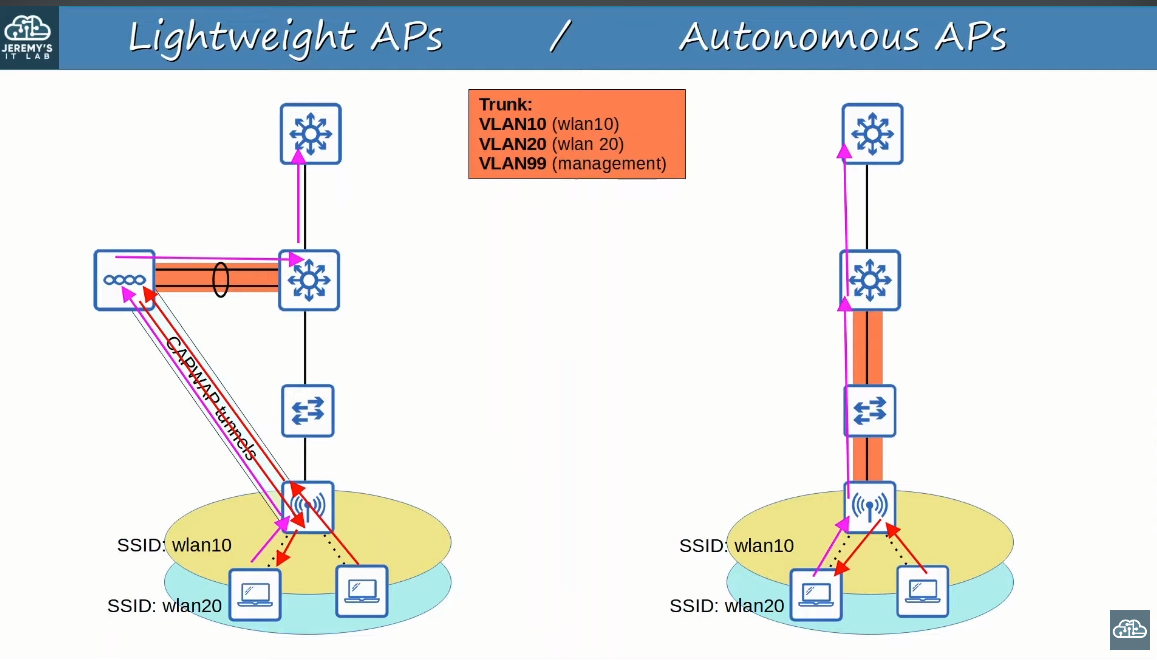
Each AP is connected to the wired network via a TRUNK. This results in the whole network needing to have the same VLAN configuration, which can cause:
- Large Broadcast Domains
- STP disabling links
- Each VLAN configuration is labor-intensive
Also, each packet has a direct path through the network, and if the destination`s device is in the same AP, that AP will only forward that packets inside itself.
Autonomous APs have the following modes:
- Repeater
- Workgroup Bridge
- Outdoor Bridge
Lightweight APs
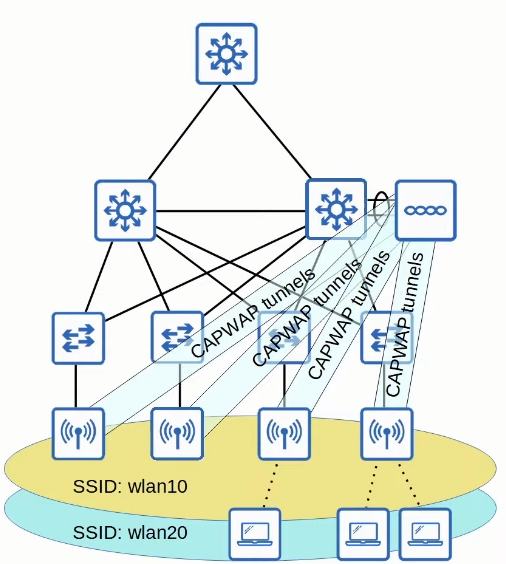
It has what is called a split-MAC architecture. What this means is that the work is split between the Lightweight APs and the WLC (Wireless LAN Controller):
- Lightweight APs: They handle “real-time” operations
- Modulation of the radio frequency to actually send and receive a frame
- Beacon and Probe Responses
- Encryption and de-encryption of frames
- WLC: It handles the configuration of the APs and controls the traffic
- Manages the RF parameters used by each AP (Transmit Power, channels, etc.)
- Security Policies
- QoS
- Client Authentication
- Client Association
- Roaming
All the configuration is done to the WLC → Only one Management IP Address.
The APs and the WLC authenticates themselves via digital certificates (X.509 standard certificates).
The WLC and APs can be in different VLANS/Subnets.
The APs and the WLC communicate via CAPWAP (Control and Provisioning of Wireless Access Points)
Two tunnels are created using this protocol:
- Control (UDP 5246): Where all the configurations travel and the control of the traffic.
- It is ENCRYPTED by default
- Data (UDP 5247): Where the actual data travels. First the data is tunneled to the WLC and then it goes to the wired network, inclusive se o cliente de destino estiver no mesmo AP ele deve passar pelo WLC.
- NOT ENCRYPTED by default
- DTLS (Datagram Transport Layer Security) is optional.
- NOT ENCRYPTED by default
Lightweight APs have the following modes:
- Local (Default)
- In this mode the AP offers a BSS (or multiple) to clients associate with.
- FlexConnect
- It is the same as local, however if the connection to the WLC is lost, it will forward traffic accordingly between the wireless and wired network
- Sniffer
- It doesn`t offer a BSS for clients to associate with.
- Captures 802.11 frames to send to a device that analyzes those frames, like Wireshark.
- Monitor
- It doesn`t offer a BSS.
- Captures 802.11 frames with the purpose of finding rogue devices and analyzing the radio frequency to monitore interferences and the overall health. If a client is a rogue device, it sends a de-authentication message to disassociate such rogue device from the AP.
- Rogue Detector
- It doesn`t offer a BSS
- Doesn`t use radio
- It receives a list of suspected rogue devices from the WLC and AP MAC addresses. It listens for ARP messages in the network and correlates that data with what it received from the WLC to better identify rogue devices.
- SE-Detector (Spectrum Expert Connect):
- It doesn`t offer a BSS
- It is used to capture data from the Radio Frequency (RF) Spectrum and send that data to a PC with a software like Cisco Spectrum Expert to analyze and present such data about the environment being studied.
- Helps to find sources of interference
- Bridge/Mesh
- Works like Outdoor Bridge, by connecting sites wirelessly.
- It can be used to connect APs without a wired connection to the wired infrastructure working like a bridge or a mesh.
- Flex plus Bridge
- The same as the Bridge/Mesh but with the capability of switching traffic locally in case the connection to the WLC is lost.
Cloud-based APs
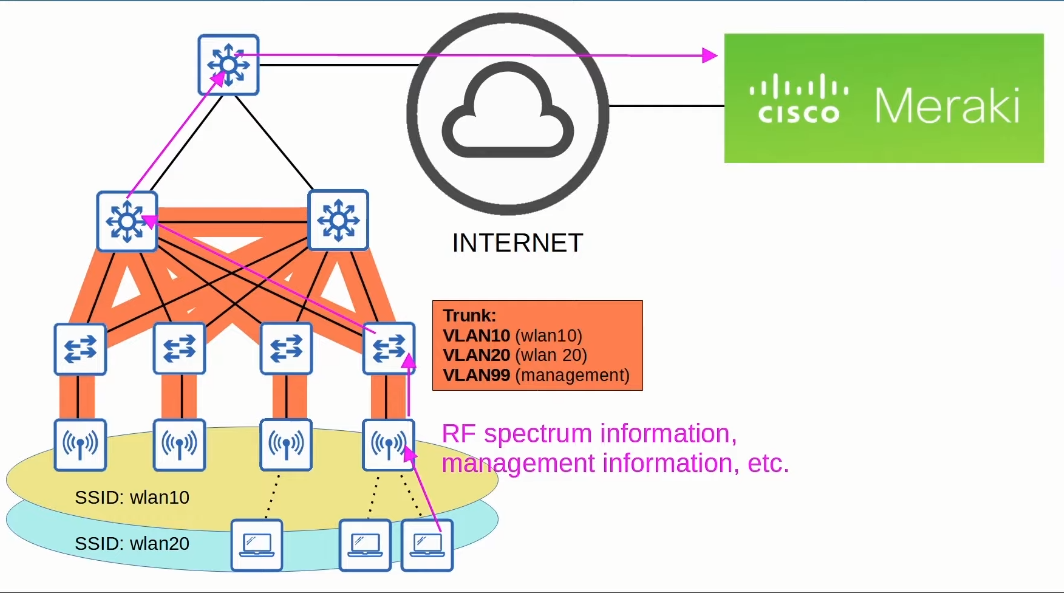
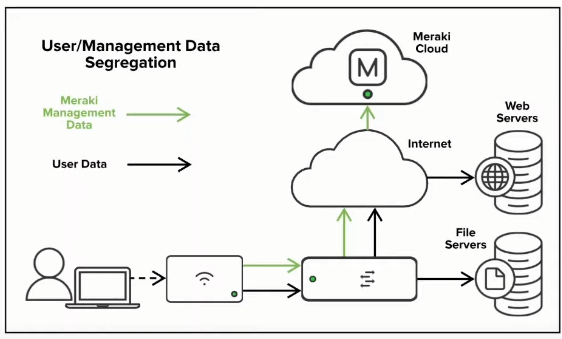
This is the type of APs the Meraki APs are.
Basically, the control of each AP is still centrally managed, it is done via the Meraki Dashboard hosted in the Cloud. However, as said only a control tunnel is used, the data is locally switched.
Benefits of using a WLC
- Scalability: It is much simpler to deploy new APs and configure them
- Dynamic channel assignment: There is no need to assign a channel to each AP manually, the WLC does it.
- Transmit power optimization: The transmit power of each AP will be configured to the needed extent. This reduces the interference between APs
- Self-healing wireless coverage: If an AP dies, the transmit power of neighboring APs can be adjusted to reduce the gray area
- Seamless roaming
- Client load-balanced: the clients can be load-balanced between APs within range
- Consistent QoS/Security policies across the network.
WLC Deployments
It refers to where the WLC will be deployed.
- Unified: It is a dedicated physical appliance.
- Up to 6000 APs
- They can be clustered to support more APs
- Up to 6000 APs
- Cloud-based: It is a VM running on the cloud.
- Up to 3000 APs
- Can be clustered
- Up to 3000 APs
- Embedded: Function embedded inside a switch
- Up to 200 APs
- Can be clustered
- Up to 200 APs
- Mobility Express: Function embedded inside an AP
- Up to 100 APs
- Can be clustered
- Up to 100 APs
Wireless Security
Authentication
It is the process of validating a client so it can associate with an AP.
You can insure authentication through:
- Passwords
- Username/Passwords
- Certificates
Some of the current Authentication Methods are:
- Open Authentication
- WEP (Wired Equivalent Privacy
- EAP (Extensible Authentication Protocol)
- LEAP (Lightweight EAP)
- EAP-FAST (EAP Flexible Authentication via Secure Tunneling)
- PEAP (Protected EAP)
- EAP-TLS (EAP Transport Layer Security)
Open Authentication
In this method, the client only sends a authentication request with NO CREDENTIALS, and it is granted access.
It is not secure, but it can be associated with other methods, such as a web authentication (i.e. Starbucks`s WiFi)
WEP (Wired Equivalent Privacy)
It is used for both authentication and encryption.
For encryption it uses RC4 algorithm, which can be easily cracked…
It is a shared-key protocol, requiring the sender and receiver to have the same key. Such keys can be 40-bit or 102-bit long. Also, it is added a IV (Initialization Vector) to bring the total lenght to 64-bit or 128-bit
EAP (Extensible Authentication Protocol)
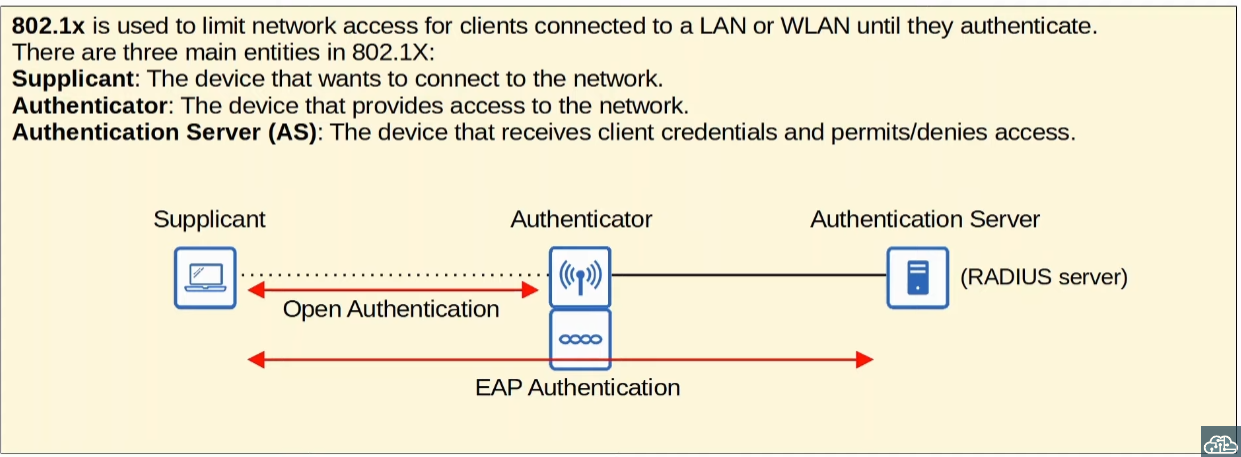
It is simply a framework of authentication. It defines authentication functions which are by the various EAP Methods.
As said before, there are 4 EAP Methods: EAP-FAST, PEAP, EAP-TLS and LEAP.
It uses the 802.1X protocol, which provides port-based network access control.
LEAP (Lightweight EAP)
It was developed by Cisco.
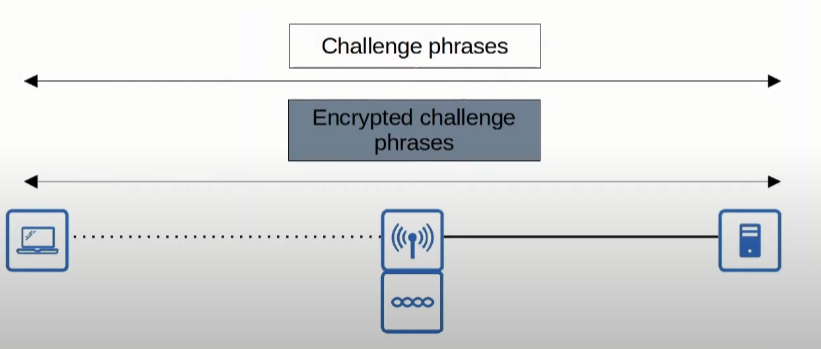
Clients must provide a username/password. In addition to that, it requires mutual authentication by each one sending an challenge phrase like WEP but for both the client and the server.
For this Dynamic WEP Keys are used to encrypt the data, which is vulnerable and should not be used.
EAP-FAST (EAP Flexible Authentication with Secure Tunneling)
It was also developed by Cisco.
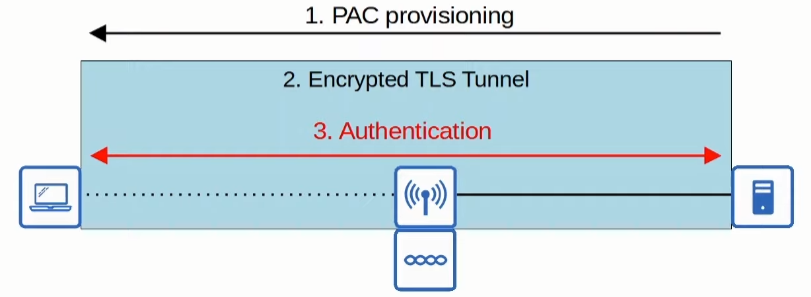
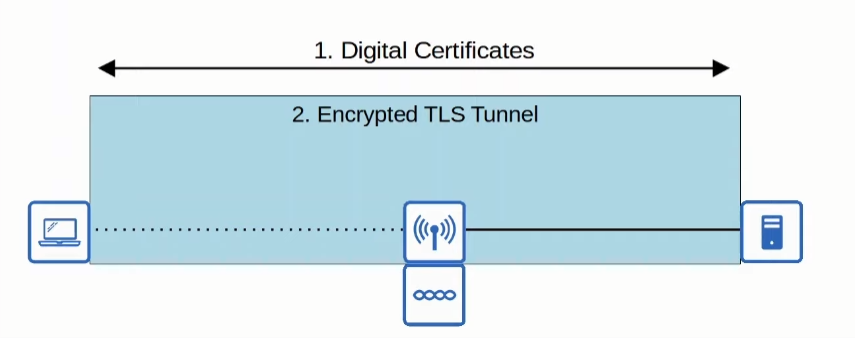
In EAP-FAST, the client first obtains a shared secret called PAC (Protected Access Credential) from the server. Using this PAC, the client establishes a secure TLS tunnel to send its credentials to the server for authentication securely.
PEAP (Protected EAP)
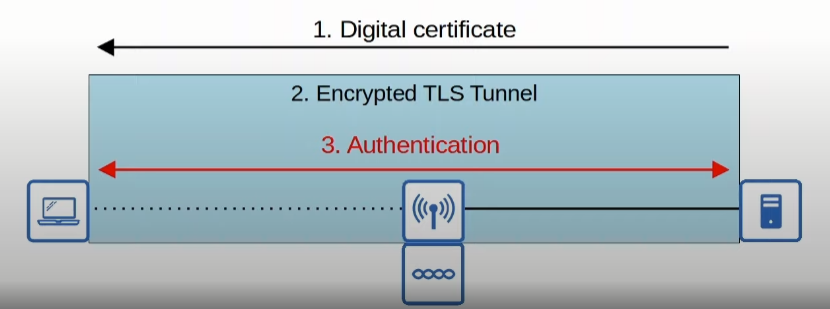
Like EAP-FAST a secure TLS tunnel is required to authenticate the credentials, however, instead of a PAC, the server first sends its digital certificate. The client then authenticates the server and a Secure TLS Tunnel is created, so it can send its credentials to be authenticated by the server.
EAP-TLS (EAP Transport Layer Security)
This time both the server and client exchange certificates, and because of that no credentials are needed. However, a secure TLS tunnel is still create to share encryption keys.
Because each client must have a digital certificate, it is the most secure authentication method!
Encryption
Due to the fact that an AP acts as a hub and that a wireless signal is not contained in a wire, frames can be captured by anyone within range. Therefore, such frames should be encrypted, so if someone catches such frame, it can`t do anything with it.
There many protocols that can be use to encrypt a data.
Some of the used Encryption Methods are:
- WEP (Wired Equivalent Protocol)
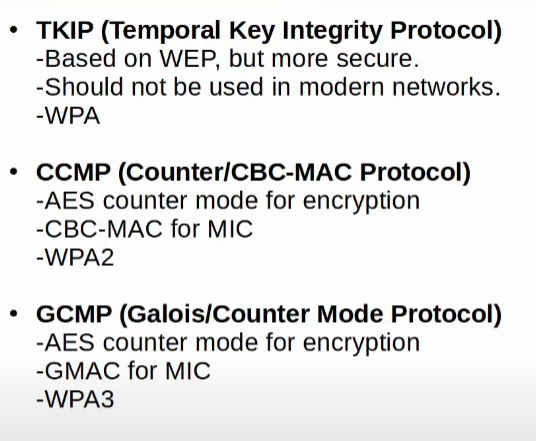
- TKIP (Temporal Key Integrity Protocol)
- CCMP (Counter/CBC-MAC Protocol)
- GCMP (Galouis/Counter Mode Protocol)
TKIP (Temporal Key Integrity Protocol)
It is based in WEP to protect devices that were only capable of using WEP after it was found to be vulnerable. Some of the features it brings over WEP are:
- A MIC (Message Integrity Check) was added
- Every frame has a unique WEP Key generated by a Key mixing algorithm.
- Initialization Vector was increased from 24 bits to 48 bits
- The MIC included the sender`s MAC Address
- A timestamp was added
- TKIP sequence number was added to keep track of each frame sent from each source MAC Address
- Used in WPA1
CCMP (Counter/CBC-MAC Protocol)
It was developed after TKIP and is more secure. And it must be supported by the hardware. It adds:
Uses two different algorithms for Encryption and MIC:
AES (Advanced Encryption Standard) counter mode encryption.
CBC-MAC (Cipher Block Chaining Message Authentication Code) is used as MIC to ensure integrity.
It is used in WPA2
GCMP (Galois/Counter Mode Protocol)
It is more secure and efficient than CCMP, allowing for higher throughput.
It uses:
AES counter mode (the same as CCMP).
GMAC (Galois Message Authentication Code) as MIC.
It is used in WPA3
Integrity
This is the propriety of making sure a message is not modified by an unauthorized third-party during the sending of a frame.
A MIC (Message Integrity Check) is added to messages to ensure integrity.
- The client (or AP, depending who is sending the message) calculates a MIC based on the protocol and message and attaches such value as a header with the message.
- The client encrypts and sends the frame
- The AP (receiver) decrypts the message
- The recipient independently calculates the MIC using the same protocol
- The recipient checks if the calculated MIC matches the message MIC
- If the same it processes the message
- If different, it discards the message
WPA (WiFi Protected Access)
They certifications provided by the Wi-Fi Alliance that bundles multiples protocols.
There are current three versions of WPA.
There is also two modes in every WPA:
- Personal Mode: In this one a Pre-Shared Key (PSK) is manually configured on each end, and for authentication it doesn`t transmit those PSKs over the air, instead it used keys generated from the PSK for the four-way handshake. Therefore, if both devices use the same PSK they will be capable of decrypting each other`s messages.
- Enterprise Mode: 802.1X is used with an authentication server (RADIUS server).
- Any EAP method can be used.
WPA
It was developed after WEP was proven to be vulnerable
- TKIP provides encryption/MIC
WPA2
- CCMP for Encryption/MIC
WPA3
- GCMP for Encryption/MIC
- Also adds the following features:
- PMF (Protected Management Frames) → prevents eavesdropping/forging
- SAE (Simultaneous Authentication of Equals) → protects the four-way handshake in Personal Mode
- Forward secrecy → prevents data from being decrypted after it was transmitted over the air.
Configuration
Types of Ports
- Service Port: A dedicated management port. Used for out-of-band management, in other words, traffic to manage the WLC is separated from the normal data traffic. Must connect to a switch in access mode, because it only supports a single VLAN.
- Distribution System Port: It is used for regular traffic, a standard port. It is used to connect to the distribution system (DS) (Wired network) and are used for data traffic. They usually connect to the switch via trunk, and can be aggregatted to form an EtherChannel (LAG).
- Console Port: Serial port used with Ethernet or USB.
- Redundancy Port: Used to connect to another WLC for High Availability (HA). If a WLC fails, the other one takes its work.
Types of interfaces
- Management interface: Used for management traffic like Telnet, SSH, HTTP and HTTPS, RADIUS Authentication, NTP, Syslog, etc. CAPWAP tunnels are also formed to/from the WLC`s management interface.
- Redundancy interface: It is used to refer to the stand-by WLC when they are connected via the redundancy port. One will be the active and the other will be the stand-by.
- Virtual Interface: It is used when communicating with wireless clients to relay DHCP requests, perform client web authentication, etc. It is always an IP Address in a non-existant subnet and a unique IP Address (i.e. 1.1.1.1). When the DHCP Server sits in a different subnet of a specific WLAN, the WLC will use the virtual interface IP Address as the source IP Address. This is used to mantain consistency across multiple relayed DHCP messages.🚨IMPORTANT: Remember that in relayed DHCP messages, the IP address in the ‘giaddr’ is used as the Destination IP address, not the Source IP address of the relayed message. Therefore, even if the IP address of the virtual interface sits in a non-existant subnet, the DHCP Server will send a Offer or Ack to the ‘giaddr’ address (usually, the Dynamic Interface IP address) and not the virtual interface`s IP address as the Destination IP Address of the frame.
- Service port interface: when a service port is used, this interface is bounded to it and used for out-of-band management instead of a management interface.
- Dynamic interface: These interfaces are used to map a WLAN to a VLAN. For example, traffic from a specific SSID, “Internal” in this example, will be sent to the wired network (DS) from the WLC`s “Internal” dynamic interface.
Layer 3 Security
- Web Authentication: After the wireless client gets an IP address and tries to access a web page, it will be prompted for a username/password.
- Web Passthrough: Does the same, but no username/password are required. Simply a warning message appears that the client must agree to gain access to the Internet.
- Conditional and Splash Page are similar, but require 802.1X layer 2 authentication.
QoS
- Bronze → This profile is designed for low-priority background traffic, such as software updates, backups, and other non-interactive applications. It provides the least priority and ensures that these services do not negatively impact higher-priority traffic.
- Silver → This profile is designed for general data traffic, such as web browsing, email, and casual file transfers. It represents the default priority level for most types of network traffic.
- Gold → This profile is intended for high-priority video applications and other types of multimedia traffic that require consistent bandwidth and low latency.
- Platinum → This profile is designed for time-sensitive and latency-sensitive traffic, such as Voice over IP (VoIP) and video conferencing applications. It provides the highest priority to ensure minimal delay and packet loss.
WLAN Types
- normal WLAN → Used for normal clients, usually employees.
- Guest LAN → Used for guest, restricting their access.
- Remote LAN → Used to connect remote branch and offices, those APs will use FlexConnect, while still being remotely configured and updated via the WLC.