Switch Interfaces
| Done |
|---|
Commands
Status of interfaces
Down or Up
show ip interfaces brief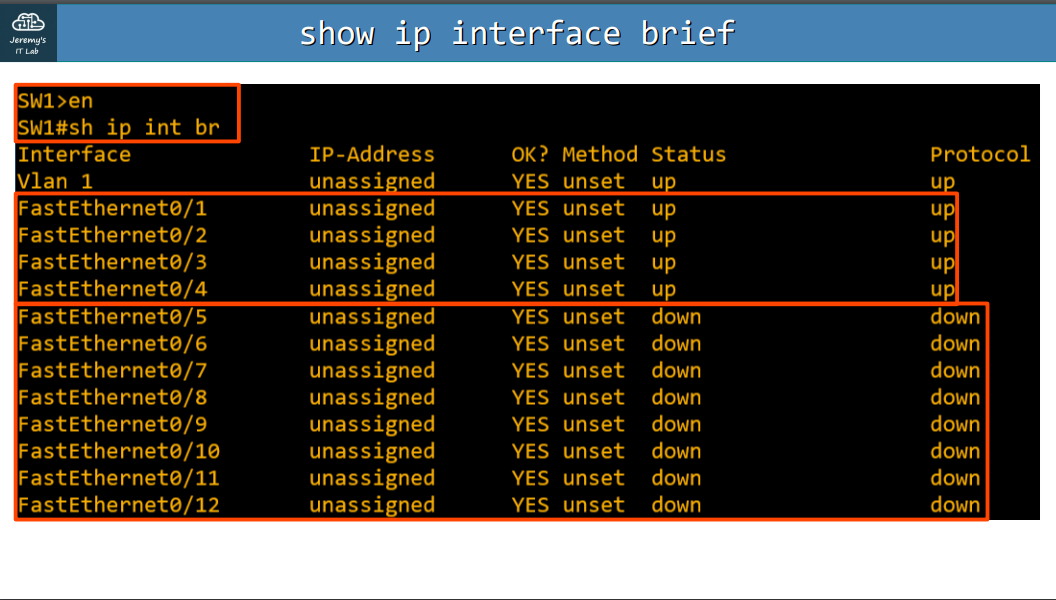
Name / Status / Vlan / Duplex / Speed / Type
show interfaces status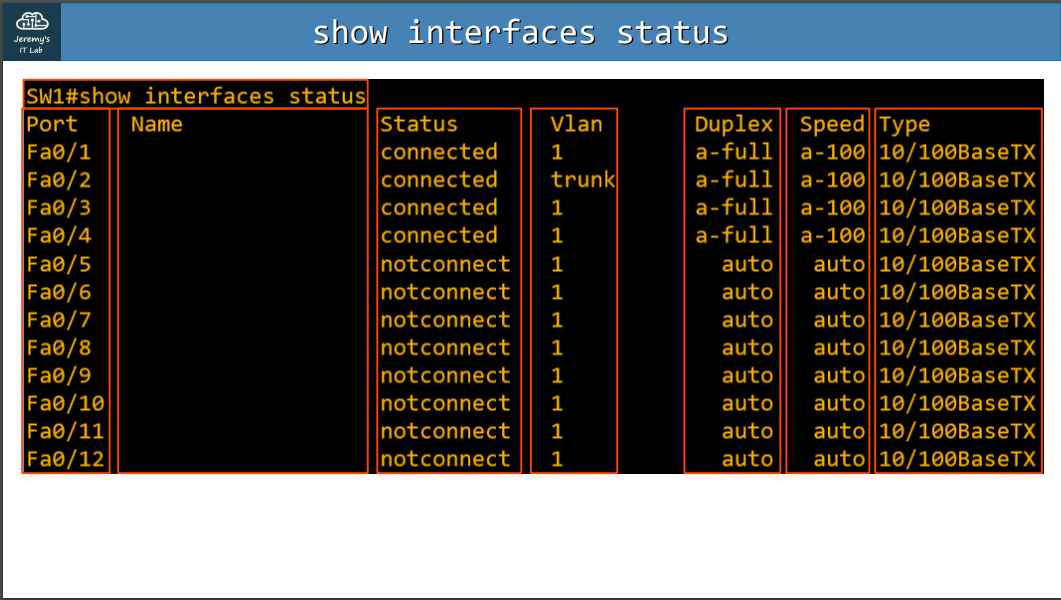
Interface settings
Speed
configure terminal //Enter Global Config Mode
interface f0/1 //Selects the interface FastEthernet0/1
speed 10 //Sets the speed of the interface to 10 Mbps
Duplex
configure terminal //Enter Global Config Mode
interface f0/1 //Selects the interface FastEthernet0/1
duplex full //Selects between Full/Half/Auto Duplex
Description
configure terminal //Enter Global Config Mode
interface f0/1 //Selects the interface FastEthernet0/1
description ## to R1 ## //Puts a name in the interface
Select a Range of interfaces
Option #1
configure terminal //Enter Global Config Mode
interface range f0/5 - 12 //Selects all ports starting from the port number 5 to the port number 12
Option #2
configure terminal //Enter Global Config Mode
interface range f0/5 - 6, f0/9 - 12 // It selects a range of port excluding the ports number 7 and 8
You can shutdown the selected ports not in use on the range selected
description ## not in use ##
shutdown  //Turn the selected interfaces into administratively down status
Duplex and Speed
Half Duplex
The host cannot send and receive data at the same time. Before sending a frame, it must check if the medium is not being used or if it is receiving a frame.
Devices connected to a hub use Half-Duplex
Full Duplex
The host can send and receive data at the same time. It does not have to wait before sending a frame.
Auto negotiation
Interfaces with different speeds (10/100/1000/10000) will have default settings of speed auto and duplex auto. This allows the switch to negotiate the appropriate speed and duplex setting of the connection with the host.
What if the host has the auto negotiation disabled?
- Speed: The switch will try to sense the speed.
- If fails, it will use the slowest speed available on the interface. 10 Mbps for example.
- Duplex: It will use Hal-Duplex for speeds of 10/100 and Full Duplex for speeds of 1000 Mbps or greater.
What if auto negotiation is disabled and a device with 100 Mbps and Full-Duplex configured?
The switch will set its interface to Half-Duplex mode because it sensed a speed of 100 Mbps, this leads to a Duplex mismatch. Also, this configuration will cause a increased amount of collisions, affecting the performance.
Errors
Runts
Frames that are smaller than the minimum size (64 bytes).
Giants
Frames that are bigger than the maximum size (1500).
CRC
Frames that failed the Cyclical Redundancy Check present in the FCS (Ethernet trailer).
Frame
Frames that came with the wrong format.
Input errors
Sum of the count of errors shown above.
Output errors
Frames that failed in being sent.