SNMP
| Done |
|---|
SNMP (Simple Network Management Protocol), is a framework and protocol used to monitor, make configuration changes, and many more services to networking devices.
There are two types of devices in SNMP:
- Managed Devices
- These are the devices being monitored (i.e. routers and switches)
- Network Management Station (NMS)
- It is the device that orchestrate the Managed Devices, the manager of managed devices.
- Could be said as the SNMP ‘server’
SNMP Operation Modes
There are essentially three main operations used in SNMP:
- Managed devices can tell the NMS of events
- The NMS can ask the devices for their current status
- The NMS can tell the managed devices to change certain configurations
SNMP Structure
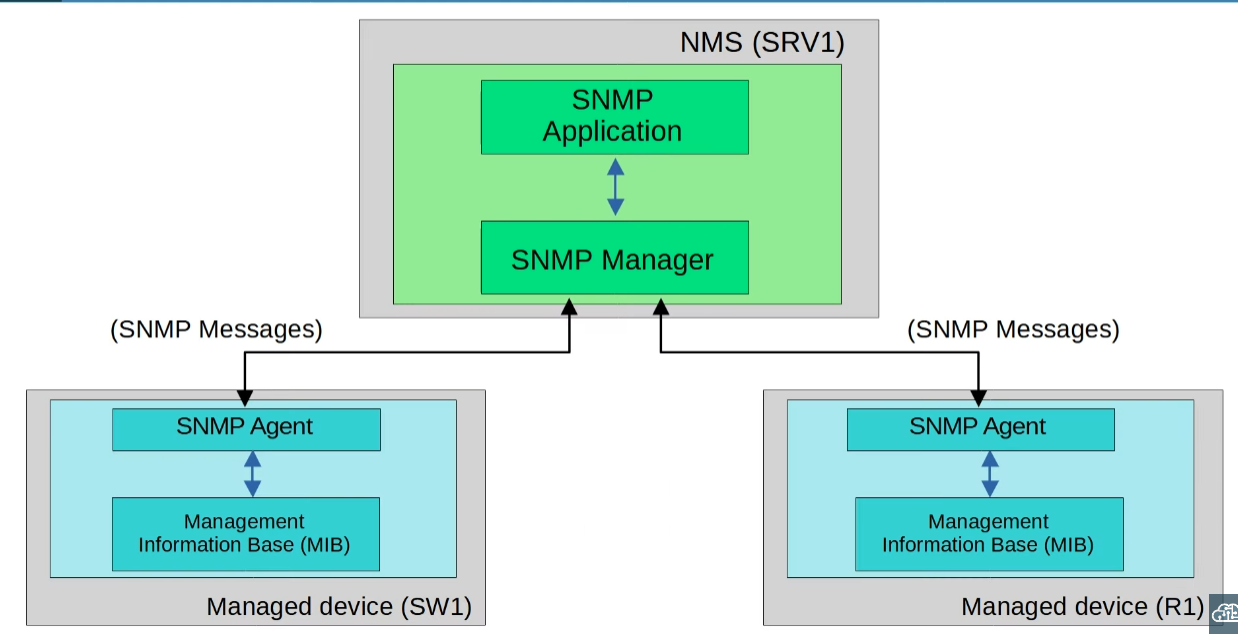
- SNMP Manager → It is the responsible for collecting and sending SNMP messages to the SNMP Agents and the SNMP App
- SNMP Application → It is the piece of software that provides an interface to interact with the network administrator
- SNMP Agent → It is the SNMP software of the SNMP instance in the managed device that communicates with the SNMP Manager in the NMS
- Management Information Base (MIB) → The ‘database’ (data structure) that stores information about the device in the form of variables (Object IDs)
SNMP Messages
| Type | Description | Message |
| Read | Asks the managed device to respond with an information. (i.e. What`s the CPU Usage?) | Get GetNext GetBulk |
| Write | Changes a configuration aspect in the managed device. (i.e. Change the IP Address of the f0/0 interface.) | Set |
| Notification | It is a message sent by the Agent to the Manager, alerting it of something. (i.e. The Interface f0/3 has gone down.) | Trap Inform |
| Response | It is a reaction to something, a response. (i.e. The CPU Usage is 50%.) | Response |
- Get → Asks the value of an specific OID.
- GetNext → Asks what OIDs are available
- GetBulk → Asks the value of multiple variables.
- Trap → Alert without a response from the NMS acknowledging it.
- Inform → Alert with a response from the NMS.
SNMP Agent Configuration
[Optional] Set the Contact and Location info
configure terminal
snmp-server contact {EMAIL}
snmp-server location {PLACE}
Set the Password (Community String)
configure terminal
snmp-server community {password} {ro | rw}- ro (Read Only) → Only allows the NMS that uses this password to read information, it can`t make any changes.
- rw (Read / Write) → Allows both reading and the manipulation of the settings of the device.
Point to the NMS
snmp-server host {ip-address} version {version} {password}Set alerts
snmp-server enable traps {event} Show command
show snmp