NTP
| Done |
|---|
All devices have an internal built-in hardware clock, it is used for multiple time-related operations. Therefore, it is important to keep the time updated.
In the CCNA, the importance of time is for logging and its protocol: Syslog (show logging).
View the current configured clock
show clock [detail]View the hardware clock
show calendarSet the time/date (Good Practice)
- Configure the timezone
configure terminal
clock timezone {NAME} {-23 - 23}  // How much time from UT
- Set the clock
exit     // PRIVILEGE EXEC MODE
clock set {hh}:{mm}:{ss} {day} {MONTH} {year}   //Month is worded, not a number
- Update the calendar
clock update-calendar // This will update the hardware`s internal clock💡NOTE: There is also the clock read-calendar, it updates the software clock based on the hardware`s internal clock.
Daylight Save Time
configure terminal
clock summer-time {NAME} {date | recurring} {which-week-starts} {DAY} {MONTH} {hh}:{mm} {which-week-ends} {DAY} {MONTH} {hh}:{mm}
NTP (Network Time Protocol)
It is used to synchronize automatically time over the network
NTP clients request time from NTP Server.
Delay
If in the same LAN…
≤1 milissecond
If over the WAN/Internet
≤ 50 milisseconds
NTP Server Classification (Stratum)
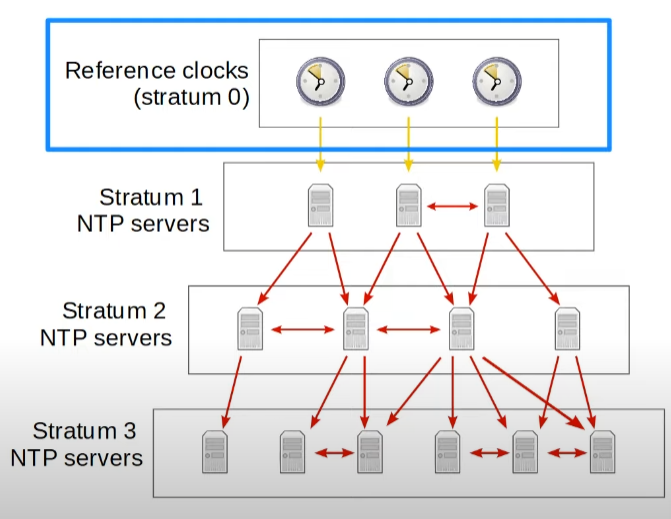
The accuracy of a NTP Server is defined by its distance from the reference clock, this measure is called stratum.
Devices like Atomic clocks and GPS clocks are the source of the time → Stratum 0
Primary Servers (NTP Servers directly connected to these clocks) → Stratum 1
Secondary Servers (Rest of the hierarchy of NTP Servers) → Stratum 2 up to Stratum 15
Configuration
Server Address
configure terminal
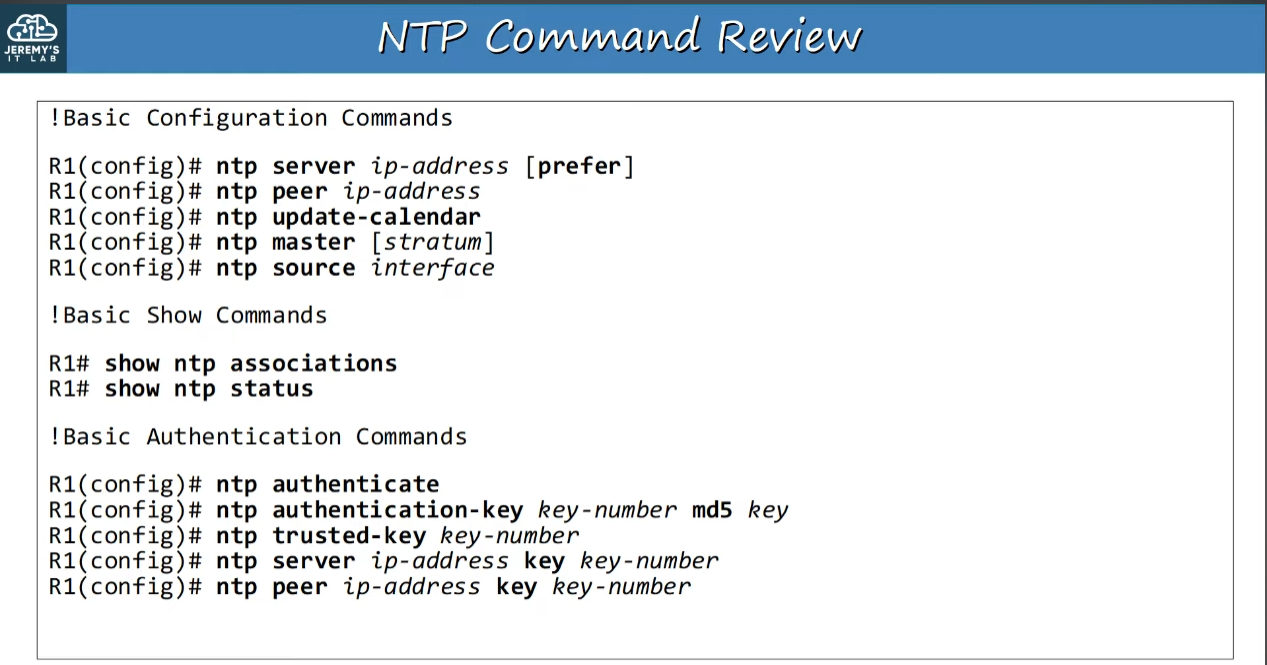
ntp server {address} [key {key-number}] [prefer] // The 'prefer' keyword gives priority to a ntp serverSee information about the NTP Servers
show ntp associations- * sys.peer → The NTP server it is actually using
- + candidate → NTP backup servers
- ~ configured → configured NTP servers
Show information about NTP
show ntp statusMake NTP update Calendar (Hardware)
configure terminal
ntp update-calendarSource NTP Interface
This is used to specify which interface will the NTP messages be sent from, so clients can synchronize to this server
configure terminal
ntp source {interface-id}
Make a device act as a Master Clock
configure terminal
ntp master [stratum] // This stratum is the one that will appear in ntp statusConfigure Symmetric active mode
This options makes the device sync with a neighboring NTP Server that has the same stratum, making it more accurate and act as a backup.
configure terminal
ntp peer {ip-address} [key {key-number}] // The key is used for authentication
NTP Authentication
This is used to sync to only NTP Servers who has the same password.
Enable
configure terminal
ntp authenticate
Set the password
configure terminal
ntp authentication-key {key-number} md5 {password}
Trust a password
configure terminal
ntp trusted-key {key-number}