NAT
| Done |
|---|
Private IP Addresses
Following the RFC 1918 the following IP Addresses ranges are considered private. Therefore, they don`t have to be globally unique and the ISP router will not forward them.
- 10.0.0.0/8 (10.0.0.0 - 10.255.255.255)
- 172.16.0.0/12 (172.16.0.0 - 172.31.255.255)
- 192.168.0.0/16 (192.168.0.0 - 192.168.255.255)
NAT
Network Address Translation (NAT) is a feature that allows the IP header of a packet to be modified. In other words, it will change the Source or/and Destination IP Addresses of the packet as configured.
This is a must feature when using IPv4 Private IP Addresses.
There are many types of NAT, one of them is Source NAT. As the name implies, it changes the Source IP Address in the IP Header statically or dynamically, as configured.
Static SNAT (Source NAT)
This is a one-to-one operation that a manually configured specific IP address as the source of the packet is translated into another pre-configured IP Address. The translated IP Address is unique. Therefore, you can`t configure a Static SNAT for multiple source IP addresses into a single translated IP Address (many-to-one).
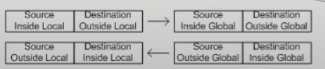
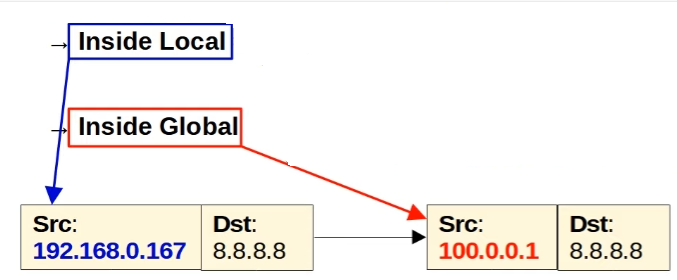
An inside local address is mapped to an inside global address.
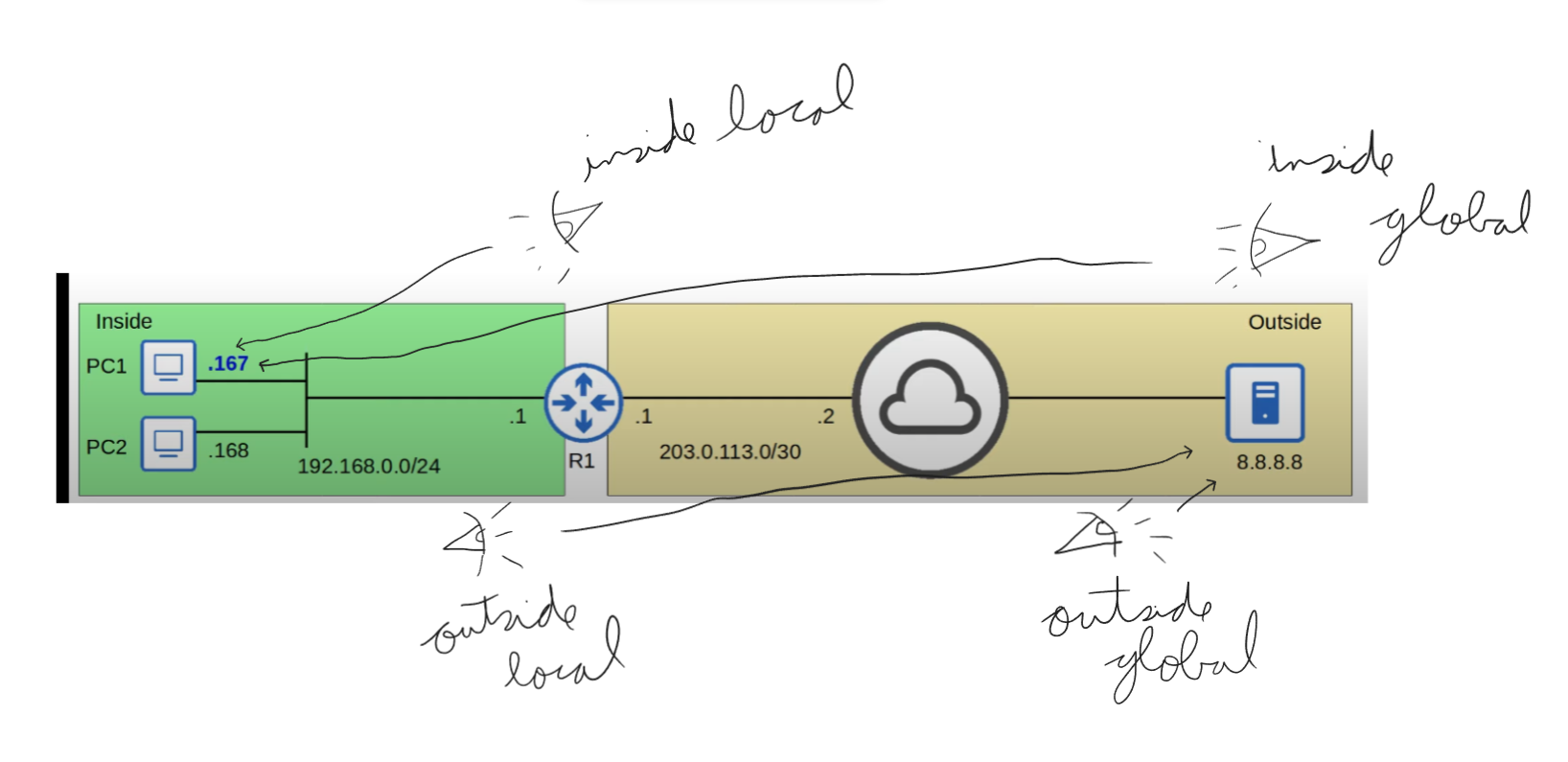
- Inside Local → Original Source IP Address
- LAN perspective
- Inside Global → Translated Source IP Address
- WAN perspective
- Outside Local → Original Destination IP Address
- LAN perspective
- Outside Global → Translated (if translated) Destination IP Address
- WAN perspective

Configuring Static SNAT
- Define the inside interface
- This is the inside network, LAN.
interface g0/1   //Example
ip nat inside
- Define the outside interface
- This is the outside network, WAN.
interface g0/0
ip nat outside
- Define the Static translations
ip nat inside source static {inside-local-ip} {inside-global-ip}- “inside” parameter → Tells if the packet before being translated by NAT will enter from the inside interface, instead of the outside interface.
Dynamic NAT
It works similarly to Static NAT, it is also a one-to-one mapping of an IP Address to another IP Address. However, this time instead of manually mapping the IP addresses, the router will automatically do this translating the IP Addresses to a pool of available IP Addresses.
An inside local address is automatically translated to one of the available inside global addresses.
To do this you must create an ACL that specifies which addresses are allowed to be translated. Also, you must create a pool that specifies the available inside global addresses.
How to configure Dynamic NAT
- Set the Inside and Outside interfaces
configure terminal
interface g0/0
ip nat outside
interface f0/1
ip nat inside
- Create the ACL that specify the range of IP Addresses to be translated
access-list {1-99 | 1300-1999} permit {ip-address} {wildcard}
- Create the pool of inside global IP addresses
ip nat pool {POOL-NAME} {first-address} {last-address} {prefix-length /{prefix-length} | netmask {mask}}
- Apply the NAT
ip nat inside source list {acl-id} pool {POOL-NAME}
Dynamic PAT / NAT Overload
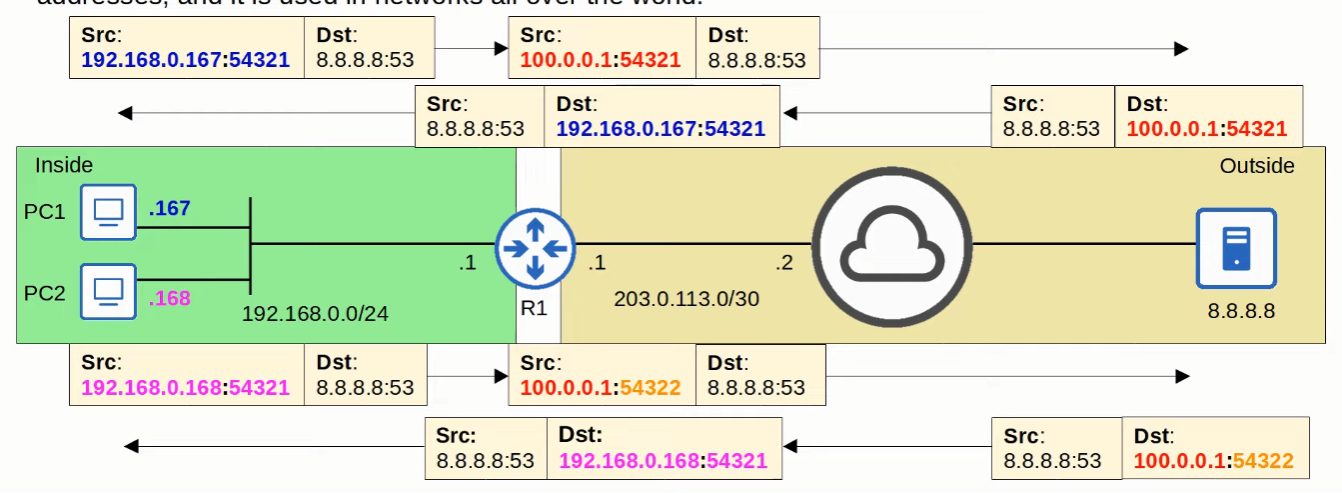
This is the most common use for NAT, it allows a many-to-one operation, where multiple inside local IP Addresses can be translated to a single IP Addresses.
It can do that by remembering the source port used by each inside host and bonding them together, so when the reply comes, it knows for which IP address to translate back to a inside local IP addresses by the destination port that the server replies.
How to configure PAT
Option #1 - Pool
- Specify the inside and outside interfaces
configure terminal
interface g0/0   //EXAMPLE
ip nat outside
interface f0/1   //EXAMPLE
ip nat inside
- Specify the range of IP Addresses to be translated
access-list {acl-id} permit {ip-address} {wild-card}
- Create the pool of inside global (public) IP Addresses
ip nat pool {POOL-NAME} {first-ip} {last-ip} {prefix-length /{prefix-length} | netmask {mask}}
- Apply the NAT
ip nat inside source list {acl-id} pool {POOL-NAME} overload
Option #2 - Router`s External Interface (Recommended)
- Specify the inside and outside interfaces
configure terminal
interface g0/0   //EXAMPLE
ip nat outside
interface f0/1   //EXAMPLE
ip nat inside
- Specify the range of IP Addresses to be translated
access-list {acl-id} permit {ip-address} {wild-card}
- Apply NAT
ip nat inside source list {acl-id} interface {interface-id} overload
See the NAT Translations
show nat translationsClear NAT Translation table
clear ip nat translations *See NAT Statistics
show ip nat statisticsREMEMBER
Inside/Outside → Location of the device
Local/Global → Perspective