IPv6
| Done |
|---|
Benefits
- Dramatically higher number of IP Addresses
- Built-in security
- Automatic address configuration
- Simple header structure
- better support for mobile devices
Which technologies assist in the transition from IPv4 to IPv6?
- Dual-stacking
- Allows a device to work with both IPv4 and IPv6, therefore, having access to both networks
- 6to4 tunneling
- Allows an IPv4 network to encapsulate and transport IPv6 traffic
- 4to6 tunneling
- Allows and IPv6 network to encapsulate and transport IPv4 traffic
Hexadecimal
IPv6 is written in hexadecimal.
In comparison with IPv4`s 32 bits of length, IPv6 has 128 bits of length → 2^128 IP addresses. It is also grouped in 8 set of 4 hexadecimal numbers. For example: 4ef4:223b:6789:ab34:73fe:51bb:aaaa:56be
Abbreviation
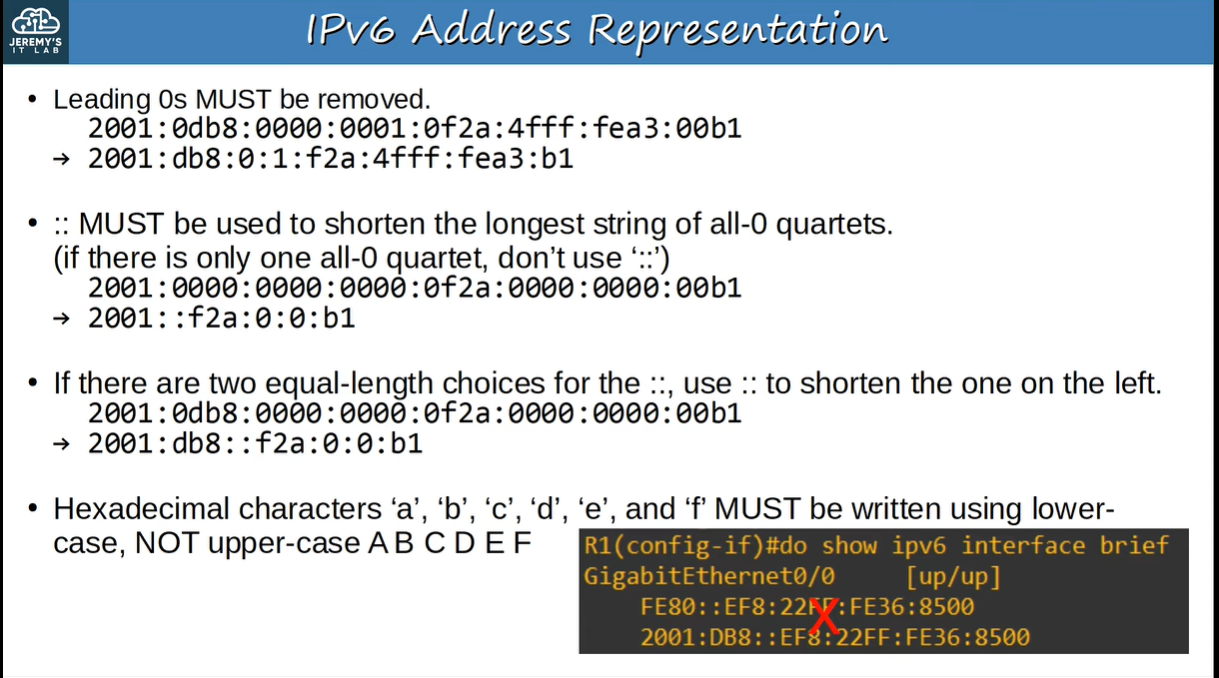
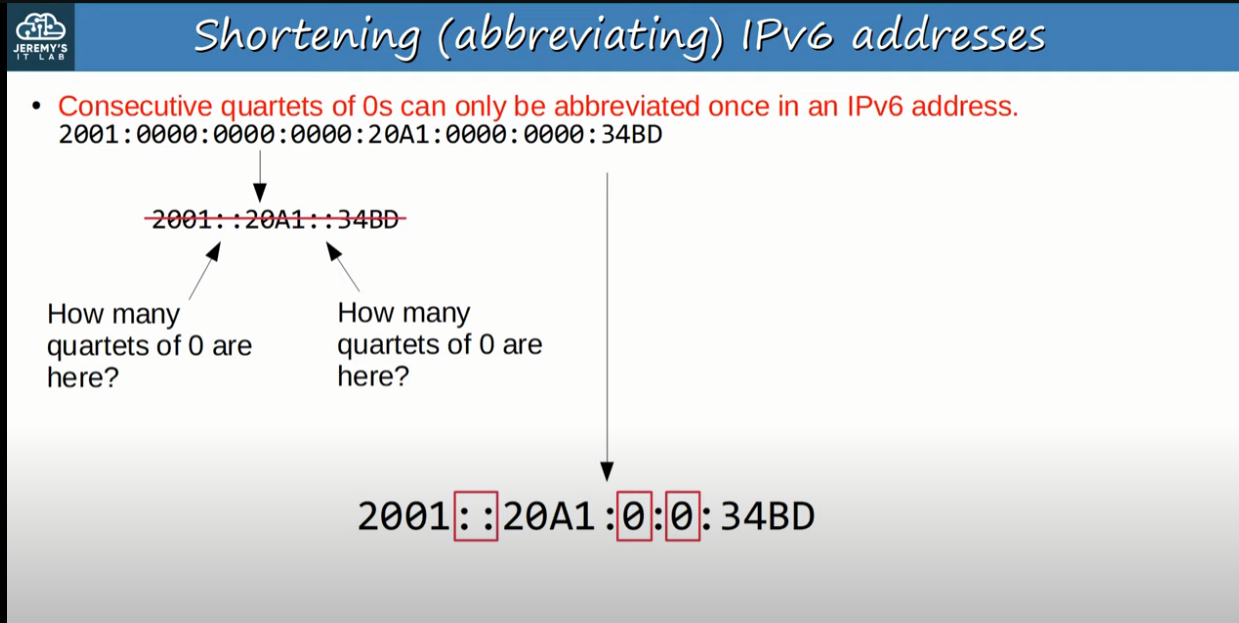
- Leading 0s can be “erased”
- For example 2001:002f:000b:43db:000c:0bce:3958:8908 → 2001:2f:b:43db:c:bce:3958:8908
- Consecutive quartets can be omitted (ONLY 1 TIME)
- For example 2001:0000:0000:0000:0000:be45:ac48:51cd → 2001::be45:ac48:51cd
IPv6 Assignment (Global Unicast Addresses)
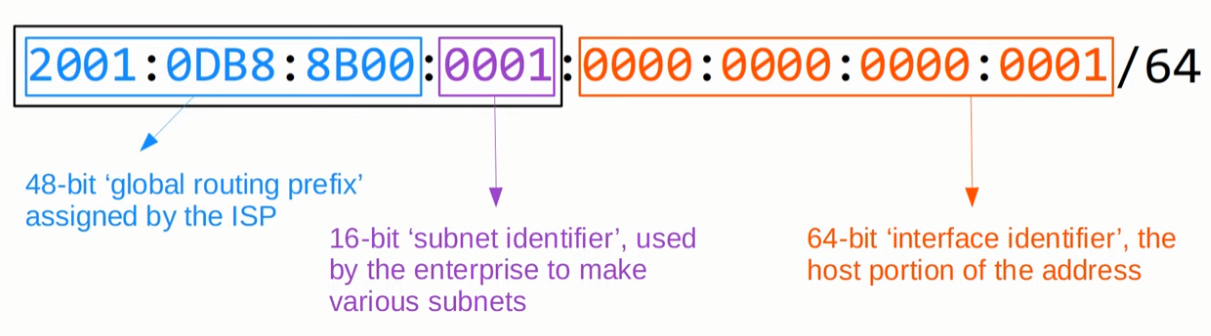
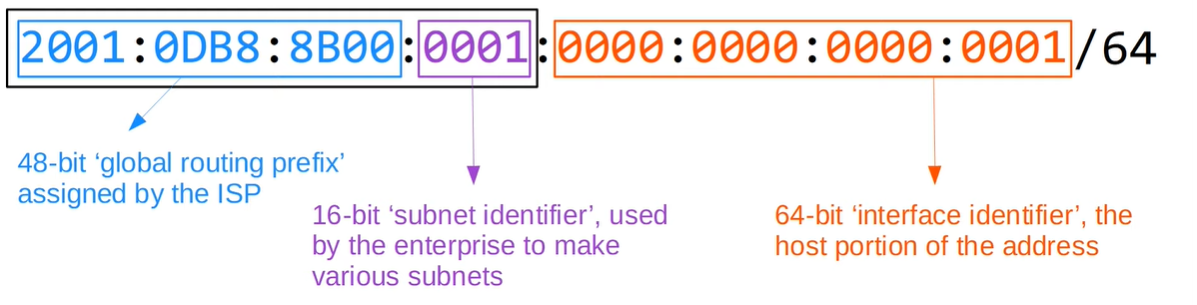
Typically enterprises have a /48 network assigned to them, but usually an IPv6 address has an prefix of /64 → There are 16 bits for subnets and 64 bits for hosts.
Basic IPv6 Configuration
Enable IPv6 on a router
configure terminal
ipv6 unicast-routing
Assign an IPv6 address to an interface
configure terminal
interface g0/0
ipv6 address {ipv6-address}/{prefix}
Show IPv6 interfaces
show ipv6 interface briefModified EUI-64
Also known as Extended Unique Identifier, it is a method of converting the MAC Address of the interface into a 64-bit unique identifier.
This will become the host portion of the /64 IPv6 address.
- Divide the MAC Address in half
- For Example: 1234 5678 90AB → 1234 56 | 78 90AB
- Insert FFFE
- 1234 56FF FE78 90AB
- Invert the 7th bit
- 1234 56FF FE78 90AB → 1034 56FF FE78 90AB
Configure an IPv6 Address using EUI-64
configure terminal
interface g0/0
ipv6 address 2001:0db8:0000:0001/64 eui-64  //It will create an Host IP based on the MAC Address
no shutdown
Types of IPv6 Addresses
Global Unicast
These type of addresses are globally unique identified. They are a public address that needs to be register, it identifies a network in the whole world.
They are in the range of 2000:0000:0000:0000:0000:0000:0000:0000 - 3FFF:FFFF:FFFF:FFFF:FFFF:FFFF:FFFF:FFFF (2000::/3). Therefore, it starts with 2 or 3.
Usually in a given IP Address by your ISP there will be the 48-bit Global Routing Prefix” followed by the “subnet identifier” and then “interface identifier”
Unique Local
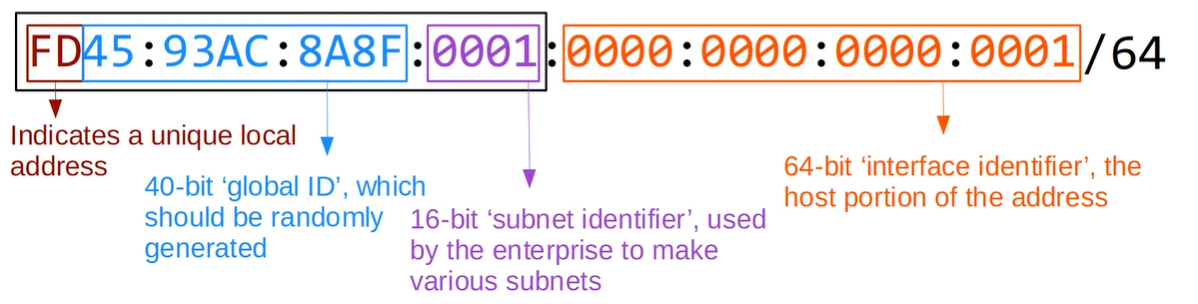
These addresses don`t need to be registered. They are not used in the internet, only internally, so if you send it to you ISP, the packet will be dropped.
It is all the address that start with FD (FD00::/8)
Besides from the Unique local identifier, there is a 40-bit Global ID, and again the subnet identifier and the interface identifier
Link Local
It is an address that the host portion is GENERATED based on the interface MAC Address (EUI-64). It is therefore, the address associated with the interface.
It is ONLY USED inside the subnet. Therefore, you CAN`T use it as the destination IP address of a packet, it will be dropped.
It is mainly used for:
- Routing Protocols peerings (OSPFv3 uses it to form adjancies)
- Next-hop IP Addresses for static routes
- NDP (Substitute of ARP in IPv6)
It is identified by FE80::/10
Multicast
It is an address of one-to-many. It is a packet to all the devices that joined that multicast group.
It is identified by FF00::/8
| Purpose | Multicast IPv6 address | Multicast IPv4 Equivalent |
|---|---|---|
| All nodes/hosts (”IPv6 Broadcast”) | FF02::1 | 224.0.0.1 |
| All routers | FF02::2 | 224.0.0.2 |
| All OSPF routers | FF02::5 | 224.0.0.5 |
| All OSPF DR/DBR | FF02::6 | 224.0.0.6 |
| All RIP routers | FF02::9 | 224.0.0.9 |
| All EIGRP routers | FF02::A | 224.0.0.10 |
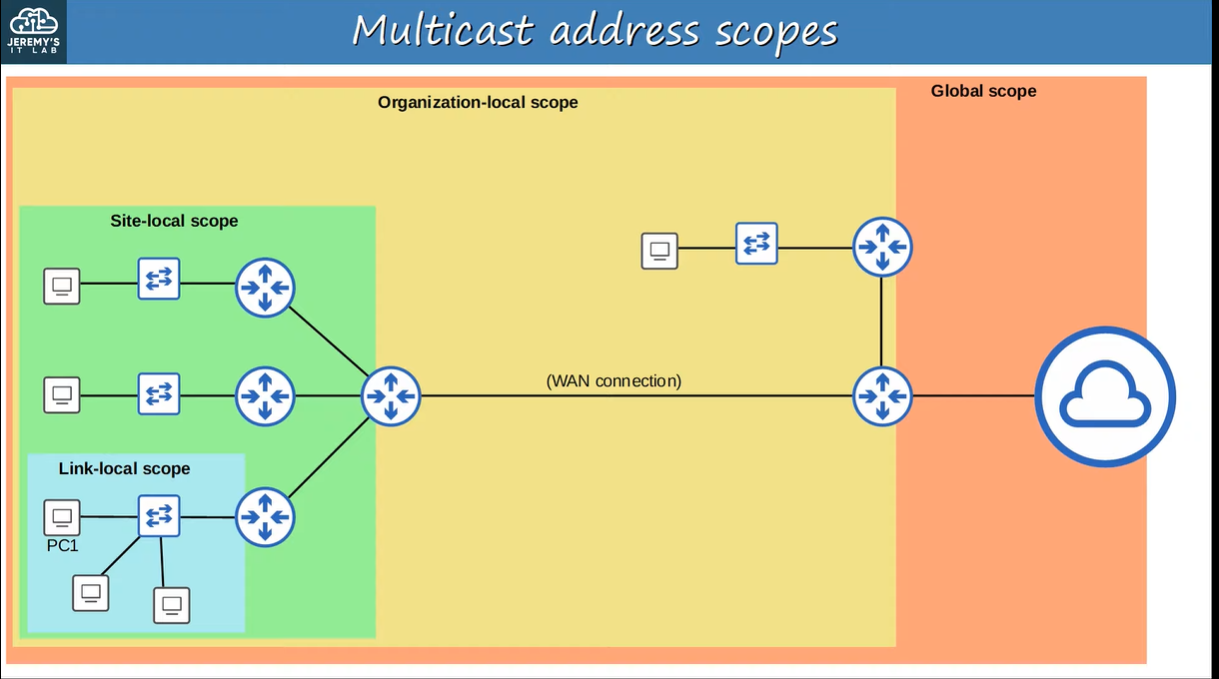
The Multicast addresses are by itself divided in scopes, which say how much a packet can travel, some of them are:
- Interface-Local / Node-Local(FF01)
- These addresses are used inside the actual device. They never leave the device.
- Link-Local (FF02)
- Don`t mess it up with the Link Local Addresses, these are multicast addresses that can go only up to the boundaries of the subnet just like a link local address, but multicast instead of unicast.
- They can only be forwarded inside a subnet. Routers will not route these addresses.
- Site-Local (FF05)
- These packets only stay inside a single geographical location.
- You might wonder: “How can it be confined to a geographical location?”. The answer is, it will be defined by the Network Engineer
- Organization-Local (FF08)
- These packets stay inside a Organization network.
- Defined by the Network Engineer
- Global (FF0E)
- “These packets can reach any packet in the world.” No Boundaries.
Anycast
It is a new feature introduced in IPv6. It is a one to one-of-many, you could also say one-to-multiple but only one is going to receive that packet.
You might wonder, what is the difference from Multicast? The answer is that only one will receive the packet, not many.
You could also think, then what is the difference from Unicast? Both will be sent to only one device, but the difference lies in the fact that anycast can be configured as a shared IP address while Unicast is unique.
So how does it select the device that will receive that packet, it will be the one with the lowest routing metric
It also has no range, so you can use a Global Unicast or a Unique Local address as a anycast address, you just have to add the anycast statement in the end of the ipv6 address command.
configure terminal
interface g0/0
ipv6 address FD89:0001:5345:243D:4324:5434:BBDD:0221/128 anycast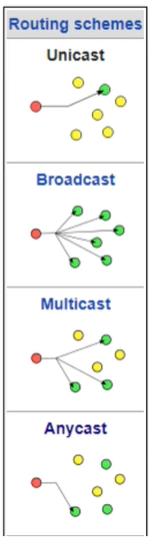
Special IP Addresses
- :: → The unspecified IPv6 address
- Can be used when the device doesn`t know its IPv6 address
- is used to define the default route → ::/0
- IPv4 equivalent: 0.0.0.0
- ::1 → Loopback Address
- It is used to test the network stack in the device itself.
- IPv4 equivalent: 127.0.0.0 - 127.255.255.255
IPv6 Header
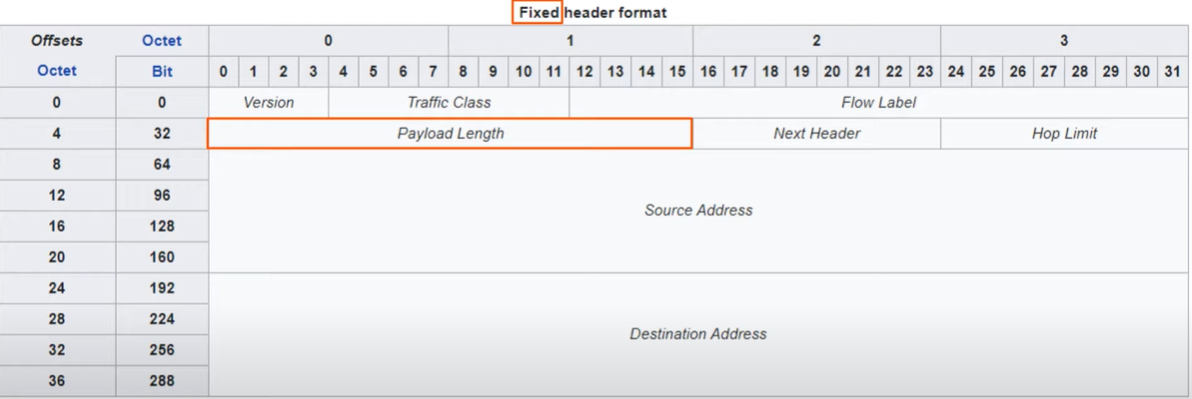
Version
Length: 4 Bits
Specifies the version of the IP Protocol being used, it will always be 6 in Binary (0b0110)
Traffic Class
Length: 8 Bits
Used for QoS (Quality of Service)
Flow Label
Length: 20 Bits
Used to identify specific traffic flows between a specific source and destination
Payload Length
Length: 16 Bits
It is used to indicate the size of the L4PDU.
Next Header
Length: 8 Bits
Indicates the type of the L4 PDU header: TCP or UDP.
Hop Limit
Length: 8 Bits
Tells how much the packet has been forwarded. Each time it passes by a router, the value is decremented by 1. If it reaches 0, the router will drop the packet.
Source and Destination IP Addresses
Length: 128 Bits each
IPv6 Addresses
NDP
NDP (Neighbor Discovery Protocol) is the IPv6 version of ARP. It uses ICMPv6 and the Solicited-Node Multicast Address to associate a device`s MAC Address with its IPv6 Address
There are four types of NDP messages:
- Router Solicitation (RS) = ICMPv6 Type 133
- These messages are sent every time an interface is enabled/host is connected.
- Sent to Multicast Address ff02::2 (all routers)
- Asks all the routers in that subnet, to identify themselves.
- Router Advertisement (RA) = ICMPv6 Type 134
- These messages are a response to the RS or they can be sent periodically.
- Sent to Multicast Address ff02::1 (all nodes)
- Routers announce their presence. Also more information is provide, like the prefix of the subnet for SLAAC.
- Neighbor Solicitation (NS) = ICMPv6 Type 135
- Neighbor Advertisement (NA) = ICMPv6 Type 136
NDP Also has another feature → DAD (Duplicate Address Detection)
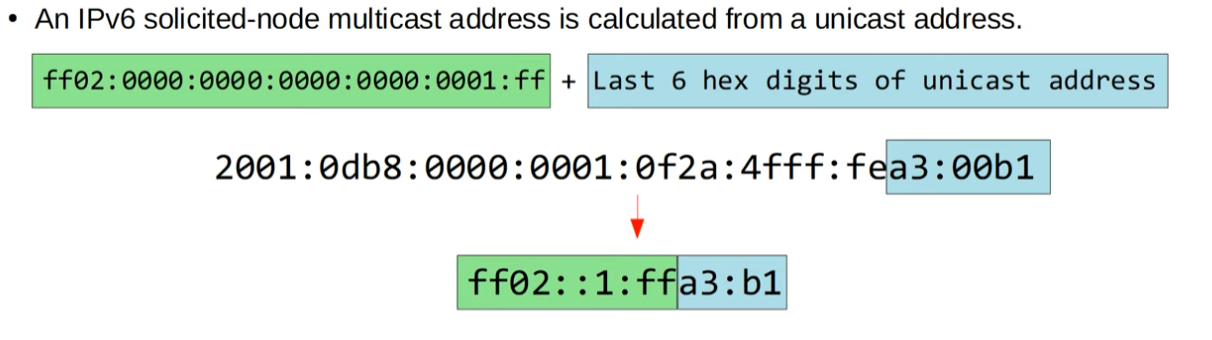
Solicited-Node Multicast Address
How Usual NDP works
- Host 1 calculates the Host 2`s Solicited-Node Multicast Address by the unicast address entered in the ping command.
- Host 1 sends a Neighbor Solicitation message via ICMPv6 with the destination IPv6 address as the Host 2`s Solicited-Note Multicast Address and the Destination MAC Address as the Multicast MAC Address based on Host 2 Solicited-Node Multicast Address.
- Host 2 replies with a Neighbor Advertisement with its IPv6 address in the source and the destination IPv6 address as Host 1 (Learned via the source IPv6 address on the NS), and also the source MAC Address as its MAC Address and the destination MAC Address as Host 1 (Also learned via the NS).
For example:
Host 1: 2001:db8::1 Host 2: 2001:dn8::bb:abc2
NS:
| Source IPv6 | Destination IPv6 | Source MAC | Destination MAC |
|---|---|---|---|
| 2001:db8::1 | ff02::1:ffbb:abc2 | Host 1 MAC | IPv6mcast_ff: bb.ab.c2 |
See NDP Table
It is the equivalent to the ARP table.
show ipv6 neighborSLAAC
SLAAC (Stateless Address Auto-Configuration) is a way of automatically configure an IPv6 address on a host using that subnet`s router interface to learn the prefix and default-gateway using NDP, then they generate an IPv6 using EUI-64 or randomly generate the interface identifier.
ipv6 address autoconfigDAD
It allows the device to know if there is another device in the local link using the same IPv6 Address as it.
It is used whenever a no shutdown command is issued or an ipv6 address is entered.
It uses the NS/NA messages. By sending an NS with its own IPv6 address, if it gets a reply, it will know it has a duplicate address.
IPv6 Static Routing
It works the same as IPv4 routing. The router will generate a separate routing table for each IP version.
configure terminal
ipv6 route {destination}/{prefix length} {next-hop | outgoing-interface [next-hop]} [ad]
Remembering, there are 3 types of Static Routes:
- Directly attached
- When you only specify the outgoing interface
- Doesn`t work with IPv6 via Ethernet!
- Recursive
- When you only specify the next-hop address
- Fully specified
- When you specify both the outgoing interface and the next-hop address
- Used for Link-Local address as next-hop
Default Route
configure terminal
ipv6 route ::/0 {next-hop | outgoing-interface [next-hop]} [ad]
Extra