ACL
| Done |
|---|
ACLs (Access Control List) have multiple uses, and among one of them is a packet filter. It can filter certain packets by looking for the following:
- Source/Destination IP Addresses
- Source/Destination Layer 4 Ports
- Other parameters
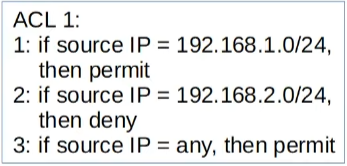
ACLs are an ordered sequence of ACEs (Access Control Entries). Think of them as lines of “if” and “elif” (Python) in a programming language which will be executed sequentially from top to bottom, and when it finds a match it will ignore the rest of the code.
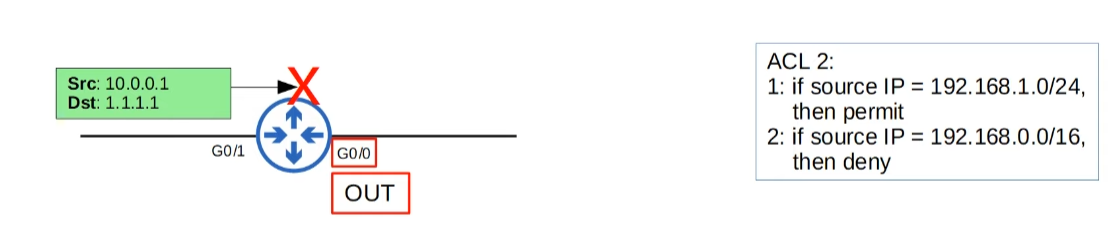
Also, ACLs can be applied for traffic inbound (entering the interface) or outbound (leaving the interface)
Implicit Deny
If a packet arrives at an interface, and it has no matching ACE in the ACL, it will be denied.
Types of ACLs
- Standard ACLs: Filter only by Source IP Address
- Standard Numbered ACLs
- Standard Named ACLs
- Extended ACLs: Filter by a combination of Source/Destination IP Address, Source/Destination port, etc.
- Extended Numbered ACLs
- Extended Named ACLs
Show ACLs
Option #1 Show all ACLs with all types
show access-listsOption #2 Show only IP ACLs
show ip access-listsStandard ACLs
Numbered
This type of Standard ACL is identified with a number (i.e. ACL 1, ACL 2, ACL 3, etc.)
These number can range from 1-99 and 1300-1999.
Configure Standard Numbered ACL
configure terminal
access-list {number} {deny | permit} ip-address wildcardAdd an entry to an existing ACL
configure terminal
access-list {acl-number} {deny | permit} ip-address wildcardAdd commentary entry to an existing ACL
configure terminal
access-list {acl-number} remark {text}APPLY an ACL to an interface
configure terminal
interface g0/0     // Here the interface Gigabit 0/0 is an example
ip access-group {acl-number} {in | out}
Named
This type of Standard ACL is identified by a name (i.e. BLOCK_BOB)
And differently from numbered, you first have to enter in “standard named ACL mode”
Enter Standard Named ACL Mode
configure terminal
ip access-list standard {acl-name}Add an ACE (entry) to the ACL
[entry-number] {deny | permit} ip-address wildcardResequencing an existing Access List
This is a useful feature if you want to inset values in between entries but they have no space for it (i.e. 1,2,3,4,5…). So you could you use this command to make the OS use different number of each entry maintaining the sequence.
configure terminal
ip access-list resequence {acl-name | acl-number} {starting-number} {increment}
Remove an ACE (entry) on an ACL
configure terminal
interface g0/0
ip access-list standard {acl-name}
no {entry-number}APPLY an Standard Named ACL to an interface
configure terminal
interface g0/0 // Here this an interface being used as example
access-group {acl-name} {in | out}
Extended ACLs
They work with the same principle as standard ACL, but they use more parameters to narrow the content filtering, thus being more precise and complex.
Numbered ACLs
configure terminal
access-list {number} [permit | deny} {protocol} {source-ip} {wildcard} {destination-ip} {wildcard}
Named ACLs
configure terminal
ip access-list extended {acl-name | acl-number}
[entry-number] {permit | deny} {protocol} {source-ip} {wildcard} {destination-ip} {wildcard}Filter by port number
If you block a port number, you are blocking a specific service (a layer 7 protocol), like SSH, FTP and etc.
[entry-number] {permit | deny} {source-ip} {wildcard} [{eq|gt|lt|neq|range} {port-number}] {destination-ip} {wildcard} [{eq|gt|lt|neq|range} {port-number}] - eq → “Equal to” (=)
- gt → “Greater than” (>)
- lt → “Less than” (<)
- neq → “Not equal to” (≠)
- range → Consecutive number (i.e. 80-90)